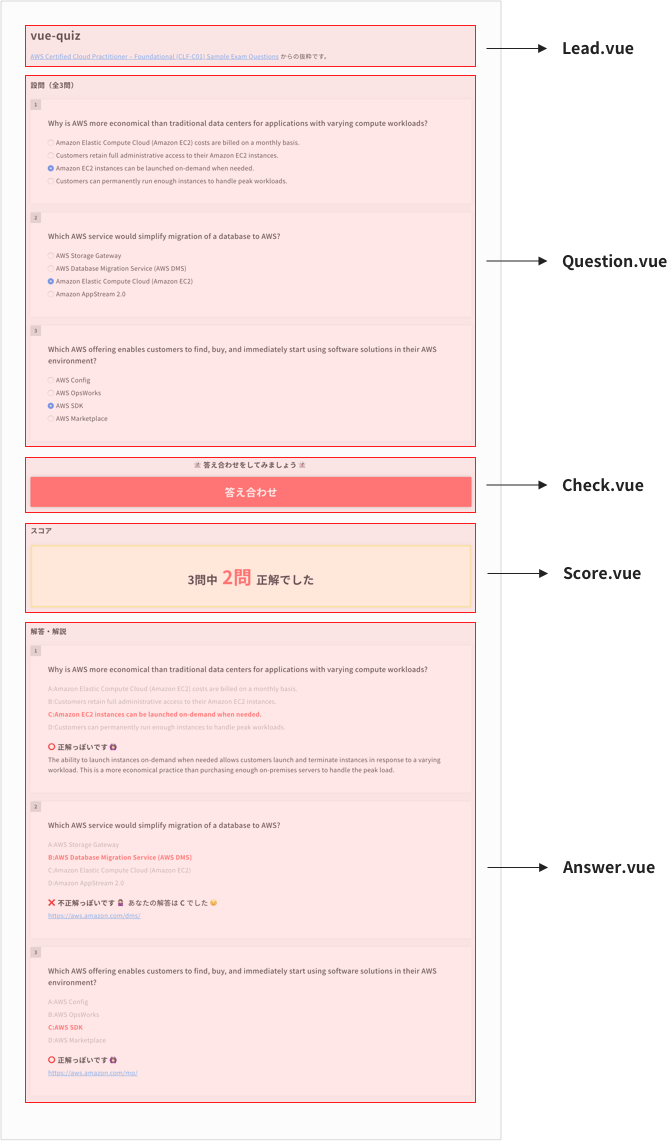
A Vue.js project
# install dependencies
npm install

# serve with hot reload at localhost:8080
npm run dev

# build for production with minification
npm run build

# build for production and view the bundle analyzer report
npm run build --report
For a detailed explanation on how things work, check out the guide and docs for vue-loader.
- 質問リスト 選択肢上限(jQuery)
- 質問リスト → 解答リスト 値の受け渡し
- 解答リスト 正解のクラス出し分け
- 質問リストで解答が済むまで答え合わせボタンは非活性
- 答え合わせボタン クリックイベント
- 答え合わせボタン クリックでスコアと解答リストを表示
- 答え合わせボタン 各回答の正誤判定
- スコア表示 計算
- 解答リストの解説テキスト htmlタグが出ないようにする
- リセットボタン(ページ最下部)を追加
- リセットボタン クリック時に全回答リセット
- LocalStorage で質問リストの解答を保存
- 複数時 質問リスト 選択肢上限(jQuery) チェックボックス不具合(前選択していた上限が引き継がれてしまう)
sample question & answer .json:
https://github.com/yuheijotaki/vue-quiz/blob/master/static/assets/qa.json
Format:
[
  {
    "id": 1,                // [Number] question ID
    "queText": "text",      // [String] question text
    "ansType": "single",    // "single" or "multi"
    "ansCorrect": ["A"],    // [Array(String)] correct answer. If 'ansType' is "multi", specify like ["A","B"]
    "ansChoice": {          // [String] choice answer text
      "A": "answer A",
      "B": "answer B",
      "C": "answer C",
      "D": "answer D"
    },
    "ansCommentary": "text" // [String] answer commentary using HTML tags
  },
  {
    "id": 2,
    ...
  }
  ...
]
├── /src/
    ├── App.vue
    ├── /components/
    │   ├── Lead.vue
    │   ├── Question.vue
    │   ├── Answer.vue
    │   ├── Check.vue
    │   └── Score.vue
    └── /static/
        └── /assets/
            └── qa.json