Project inspired by my G, claude 3.7 Sonnet
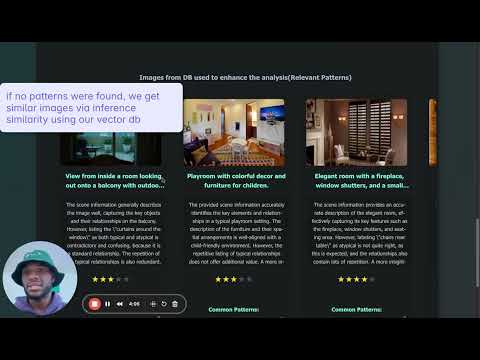
the goal is to build an AI system that doesn't just label objects in images (e.g: "there's a cup") but understands and explains meaningful relationships between objects (e.g: "the cup is balancing precariously on the edge of the table, suggesting someone might have placed it there hastily").
Scene Understanding: Identifies not just objects but meaningful situations
Anomaly Detection: Identifies unusual or important relationships
Image: A coffee mug placed precariously on the edge of a desk with papers scattered around
Standard Multimodal LLM Response:
"The image shows a white ceramic coffee mug positioned on the edge of a wooden desk. There are several papers and documents scattered across the desk surface. The mug appears to be full."
Enhanced Visual Reasoning System:
"The coffee mug is positioned unusually - it's placed at the edge of the desk rather than in a stable central position (this occurs in only 3% of similar desk scenes in my database). The scattered papers suggest interrupted work, and the mug's precarious position indicates the person likely placed it down hastily. Based on similar scenes, this arrangement suggests the person was likely called away unexpectedly during work and may return shortly. The mug's position creates a risk of spilling, which would damage the papers below - an atypical risk situation compared to normal desk arrangements I've analyzed."
The key differences:
-
Identification of what's unusual based on comparison to similar scenes
-
Statistical context from database of images
-
Temporal reasoning about what happened before and might happen after
-
Risk assessment based on learned patterns of object interactions
-
Inferences about human behavior that caused this arrangement
this system doesn't just see what's there - it understands what's unusual, risky, or indicative of certain human behaviors based on comparative analysis.


Python 3.8 or higher Node.js 16 or higher Git A Google Cloud account for Gemini API access Basic familiarity with command line operations
- Clone the repository
git clone https://github.com/yourusername/visual-reasoning.git
cd visual-reasoning
- Create a virtual environment
python -m venv venv
source venv/bin/activate  # On Windows: venv\Scripts\activate
- Install dependencies
pip install -r requirements.txt
- Set up environment variables
Create a .env file in the server directory:
touch .env
add this in your .env file:
GEMINI_API_KEY=your_gemini_api_key
-
Initialize dataset Add your initial pool of images to the image folder in server/images
-
Initialize your chroma DB Run the file server/ingestion_pipeline.py to add images from server/images and their respective metadata to your chroma db and move them to server/processed_images
python3 server/ingestion_pipeline.py
- Bootstrap initial feedback Run the file server/bootstrap_dataset_with_ai_feedback.py to create a new database for feedbacks recieved on the initial(basic) inference.
python3 server/bootstrap_dataset_with_ai_feedback.py
- Add images to your Image folder for testing(Optional) Add more images to server/images to use on the frontend (allows you to select files directly without opening a panel to select)
- Navigate to the client directory, install dependencies and go back to the root:
cd client
npm install
cd ..
open two windows in your terminal, one for the backend and the other for the backend.
-
Start the Backend Server Run the server/main.py file
python3 server/main.py -
Start the frontend
cd client npm start -
Hope you like it!
-
If you see module import errors
Ensure you're in the virtual environment
Try reinstalling requirements: pip install -r requirements.txt -
If the frontend can't connect to the backend
Check that the backend server is running on port 8000
Verify there are no CORS issues in the browser console -
If image analysis fails
Verify your Gemini API key is correct
Check the server logs for specific error messages
Open http://localhost:3000 in your browser
Upload an image or select from existing images
Try the basic analysis feature
Check if the enhanced analysis works with feedback