

Zavora is an ADK-Rust 2.0 coding agent for the terminal. It keeps routine implementation work on an efficient worker model and brings in a stronger planning model only when a task needs architectural reasoning or a material replan.
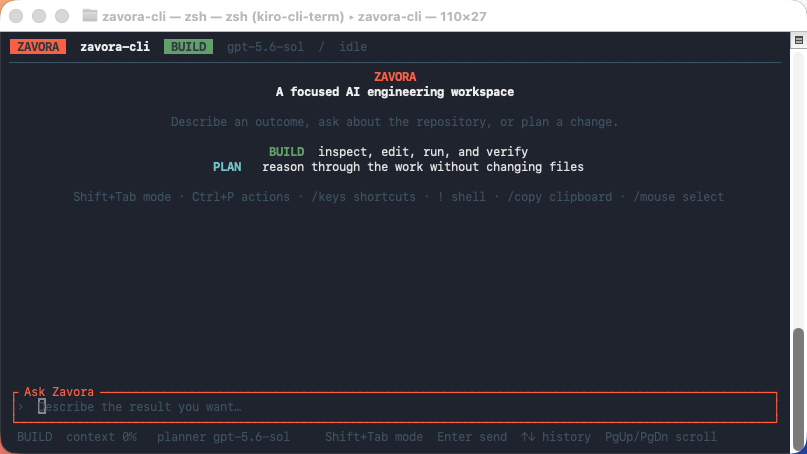
The workspace is built for long sessions: streamed Markdown and code, retained tool activity, context usage, model-role status, multiline editing, and in-place approvals for consequential actions. It adapts from a side-by-side wide layout to a compact stacked layout without losing the active conversation.
Developer ──► worker agent ──► files · shell · MCP · sessions
                    │
                    └── complex work ──► bounded planner agent
Zavora v2 requires Rust 1.95 or newer when building from source.
cargo install zavora-cliPrebuilt release wrappers are also available:
npm i -g @zavora-ai/zavora-cli
brew install zavora-ai/tap/zavora-cliOpenAI is the default provider. Store a key in the operating-system credential vault:
zavora-cli setup
zavora-cli chat
Or provide it for the current shell:
export OPENAI_API_KEY="..."
zavora-cli chat
An interactive terminal opens the retained workspace automatically. The worker route, active agent, BUILD or PLAN mode, conversation, tool runs, and composer stay visible as the session progresses. No tokens are spent generating a greeting.
For redirected output, a dumb terminal, or the complete line-oriented slash-command shell, use:
ZAVORA_CLASSIC=1 zavora-cli chatShift+Tab switch BUILD / PLAN
Enter send
Ctrl+J add a line
PageUp/Down scroll half a screen
Ctrl+O/N jump to the older / newer response
Ctrl+T/B jump to the top / bottom of the conversation
Ctrl+P search every action
Ctrl+L repaint the screen
/keys list the shortcuts this terminal can send
Esc request cancellation
PageUp and PageDown move half a screen rather than a whole one, so the previous half stays on screen and you keep your place. A view scrolled away from the newest output holds its position while a response streams in, and the bottom border reports how far from the tail it is.
Several actions carry more than one chord because terminals disagree about what they forward. Apple Terminal, for instance, sends neither Home nor End, strips Shift from PageUp, and does not deliver Ctrl- or Alt-modified arrows — so the Ctrl+letter forms are the ones that arrive there. /keys lists only the shortcuts that reach the workspace on the terminal in use, and reports an action as unavailable rather than naming a key that does nothing. See docs/TUI.md.
The mouse wheel scrolls the transcript. That costs the terminal's own click-drag selection, which is one modifier away — hold Fn in Apple Terminal, Option in iTerm2, Shift in most others — and Ctrl+R hands the mouse back entirely. docs/TUI.md explains why that is a real trade rather than a preference.
The worker owns the conversation, tools, and implementation. By default it uses gpt-5.4-mini-2026-03-17, from the larger shared daily token pool. The planner is an ADK-Rust AgentTool backed by gpt-5.6-sol. It has no mutation tools and is available only to produce a concise plan for complex work.
The planner call budget defaults to four calls for one CLI process. It is a local guardrail, not a measurement of provider-side token usage. OpenAI remains authoritative for account limits.
$ zavora-cli models

  Model routing
  WORKER  OpenAI/gpt-5.6-sol  routine turns, tools, and implementation
  PLANNER OpenAI/gpt-5.6-sol  complex plans only · max 4 calls/process

  OpenAI models available to this project

  1M shared daily pool · 250K on usage tiers 1–2
  gpt-5.6-sol                     planner strongest planning default ← worker
  gpt-5.5-2026-04-23              planner high-capability general reasoning
Roles are set independently:
zavora-cli \
  --worker-provider openai \
  --worker-model gpt-5.4-mini-2026-03-17 \
  --planner-provider openai \
  --planner-model gpt-5.6-sol \
  --planner-call-budget 3 \
  chat
Inside the workspace:
/models                         show the catalog and quota pools
/worker [model]                 switch the everyday model
/planner [model]                switch the planning model
/provider <name>                switch the worker provider
/planner-provider <name>        switch the planner provider
/status                         show the resolved runtime
Changing either role rebuilds the agent while preserving the current ADK session service.
OpenAI, Anthropic, Gemini, DeepSeek, Groq, and Ollama remain supported. The worker and planner can use different providers when both credentials are available.
# Anthropic worker with an OpenAI planner
zavora-cli \
  --worker-provider anthropic \
  --worker-model claude-sonnet-4-20250514 \
  --planner-provider openai \
  --planner-model gpt-5.6-sol \
  chat

# Fully local
zavora-cli \
  --worker-provider ollama --worker-model llama4 \
  --planner-provider ollama --planner-model qwen2.5-coder \
  chat
Credential environment variables are OPENAI_API_KEY, ANTHROPIC_API_KEY, GOOGLE_API_KEY, DEEPSEEK_API_KEY, and GROQ_API_KEY. Ollama uses OLLAMA_HOST, defaulting to http://localhost:11434.
Role-specific settings live in .zavora/config.toml:
[profiles.default]
worker_provider = "openai"
worker_model = "gpt-5.4-mini-2026-03-17"
planner_provider = "openai"
planner_model = "gpt-5.6-sol"
planner_call_budget = 4

session_backend = "sqlite"
session_db_url = "sqlite://.zavora/sessions.db"
tool_confirmation_mode = "mcp-only"
Worker precedence is CLI/environment, selected agent, selected profile, then role
defaults. The planner resolves independently and only from planner-scoped
settings — --planner-provider/--planner-model, ZAVORA_PLANNER_*, and
planner_provider/planner_model in the profile. It does not inherit the
worker provider or a bare provider setting, and defaults to OpenAI. If you move
the worker to another provider and want the planner to follow, set the planner
role explicitly.
The v1 provider and model settings are still accepted as worker aliases. New
setup runs store API keys in the OS credential vault rather than project TOML.
zavora-cli                              # interactive chat
zavora-cli ask "Explain this workspace" # one response
zavora-cli workflow parallel "Review the API and tests"
zavora-cli ralph "Implement the accepted issue"
zavora-cli agents list
zavora-cli capabilities list
zavora-cli skills list
zavora-cli skills search device
zavora-cli plugins list
zavora-cli plugins doctor --json
zavora-cli sessions list
zavora-cli mcp catalog office
zavora-cli mcp add docx-mcp
zavora-cli doctor
One-shot commands have a versioned automation surface with clean stdout, repeatable file inputs, automatic piped stdin, stable exits, and both single JSON and streaming JSONL output:
zavora-cli ask --output-format json --file README.md "Summarize this project"
git diff | zavora-cli ask --output-format stream-json "Review this patch"
See docs/HEADLESS.md for schemas, events, approvals, and
exit codes.
A capability is a curated set of MCP servers plus the specialist agent that uses them. capabilities list reports every one, with its maturity, risk, and how many of its servers are configured:
$ zavora-cli capabilities list

Productivity:
  skills: brand-guidelines, canvas-design, docx, email-operations, pdf, pptx, xlsx
    productivity.office          certified risk=high     mcp=0/5 — Create and edit Word documents, presentations, spreadsheets, PDFs, and diagrams.
    productivity.communication   preview   risk=high     mcp=0/5 — Work with email, calendars, Slack, messaging, and notifications.
    productivity.work-management preview   risk=medium   mcp=0/6 — Manage tasks, projects, schedules, workflows, forms, and surveys.
Development:
    development.core             core      risk=high     mcp=0/5 — Repository, code search, testing, dependency, and security advisory tools.
    development.delivery         preview   risk=critical mcp=0/6 — Operate CI/CD, containers, databases, infrastructure, and observability.
The agent can find the capability a request needs and turn it on. capability_status is read-only and reports, per capability, its risk, its specialist agent, and for each MCP server whether it is installed and configured. capability_enable installs the missing packages, writes them into the profile, and enables the capability — behind an approval that names the exact commands:
Install 3 packages to enable "Office Artifacts" (productivity.office)?
  cargo install slides-mcp-server
  cargo install excel-mcp-server
  cargo install mcp-pdf
Then configures 4 MCP servers and enables the capability.
risk high · certified · runs third-party code · enabling does not make the
servers usable until they connect.
"Enable office support" and "compile and install four programs from the internet" are one request described at two levels of consequence, so the approval describes the second one. The agent supplies only a capability id validated against the built-in set; every install command comes from the curated catalogue, never from the model or the prompt. Installs run as an argument vector, never through a shell.
Once the servers are configured the workspace reconnects between turns, so a capability enabled mid-session works in that session, and reports how many servers actually answered rather than assuming.
Zavora reports capability state from the live runtime rather than relying on a static prompt:
AGENTS.md,GEMINI.md, andCLAUDE.mdfamilies supply additive, scope-resolved project instructions. NativeAGENTS.override.mdtakes precedence in its directory; Gemini custom context names, Claude local/rules files, imports, deduplication, and inspection are supported..agents/skills/<name>/SKILL.mdis the preferred portable skill layout. Compatible.zavora, Claude, Gemini, Grok, and OpenCode skill roots are discovered with deterministic precedence. Skills support install/link/update/enable/disable/uninstall and are injected through ADK-Rust's plugin runtime for every model provider.- Plugins normalize native Zavora, Codex, Claude, Gemini, Grok, and OpenCode packages. Enabled packages contribute namespaced skills, portable Markdown agents/commands, and MCP servers. JavaScript/TypeScript entrypoints are reported but require an explicit trusted runtime; discovery never silently executes package code.
- Specialist subagents cover productivity artifacts, development, research, operations/devices, and independent review.
configured,connected, andauthorizedare reported separately; enabling a recipe never claims that its servers are usable.
Use zavora-cli capabilities list, zavora-cli skills list, zavora-cli agents list, and zavora-cli mcp doctor for progressively deeper inspection.
The dated competitor and gap assessment lives in docs/CLI_CAPABILITY_MATRIX.md.
The exact instruction discovery and precedence contract is documented in docs/PROJECT_INSTRUCTIONS.md.
The standard runtime includes workspace-aware file reading and editing, glob and ripgrep search, shell execution, GitHub operations, todos, time, memory, release planning, and tool discovery. Optional features add web fetching, LSP, browser automation, sandboxed code execution, and RAG.
cargo install zavora-cli --features "web-fetch,lsp,oauth,browser,sandbox,rag"MCP works in both directions:
- As a client, Zavora discovers tools from configured stdio or HTTP MCP servers.
mcp catalog,mcp add, andmcp removeprovide comment-preserving configuration for curated productivity, development, research, device, and registry servers. - As a server,
zavora-cli mcp serveexposes the built-in tool surface over stdio.
Stdio tool discovery prefers the MCP 2026-07-28 server/discover lifecycle, falls back to 2025-11-25 for compliant legacy servers, advertises tool-call task support, and bounds the handshake by the server timeout. zavora-cli mcp protocol --json reports remaining transport and authorization gates instead of overstating compatibility.
Write, shell, GitHub, and externally supplied MCP tools pass through confirmation and permission policy. The system prompt never commits or pushes unless the developer asks.
The workspace puts the terminal into states a shell cannot undo on its own: raw mode, the alternate screen, bracketed paste, and mouse reporting. All of it is undone on exit, on a panic, and on a signal — including SIGTERM and the SIGHUP a closing window sends. Without that, a killed process leaves mouse reporting on, and every pointer movement prints escape sequences into the shell. See docs/TUI.md.
Zavora uses the v2 Runner, typed events, AgentTool, session services, tool traits, model clients, skills, memory, guardrails, telemetry, MCP integration, A2A server support, and compaction APIs. The old adk-ralph 0.5 dependency and duplicate ADK runtime graph have been removed; Ralph now runs through the same v2 worker/planner runtime as chat.
See the implementation specification in .kiro/specs/v2-upgrade/ and the v1 migration notes in docs/MIGRATION_GUIDE_v2.md.
cargo fmt --all -- --check
cargo check --all-targets
cargo test --all-targets -- --test-threads=1
cargo clippy --all-targets -- -D warnings

# CLI smoke checks; these do not call a paid model
cargo run -- --help
cargo run -- models
NO_COLOR=1 cargo run -- models
The test suite is deliberately deterministic and uses ADK-Rust mock models for runtime tests.
MIT