


Hourly updated, firewall-ready IP blocklist aggregated from 18+ threat intelligence sources. ~120,000+ unique malicious IPs, deduplicated, validated, and ready to import.
https://raw.githubusercontent.com/ziyadnz/threat-intel-ip-feeds/main/output/hourlyIPv4.txt
Copy the URL above into your firewall, SIEM, or any tool that accepts a plain-text IP blocklist. One IP/CIDR per line, no comments, no headers. Updated every hour.
Full documentation: FortiGate External Block List Policy Guide
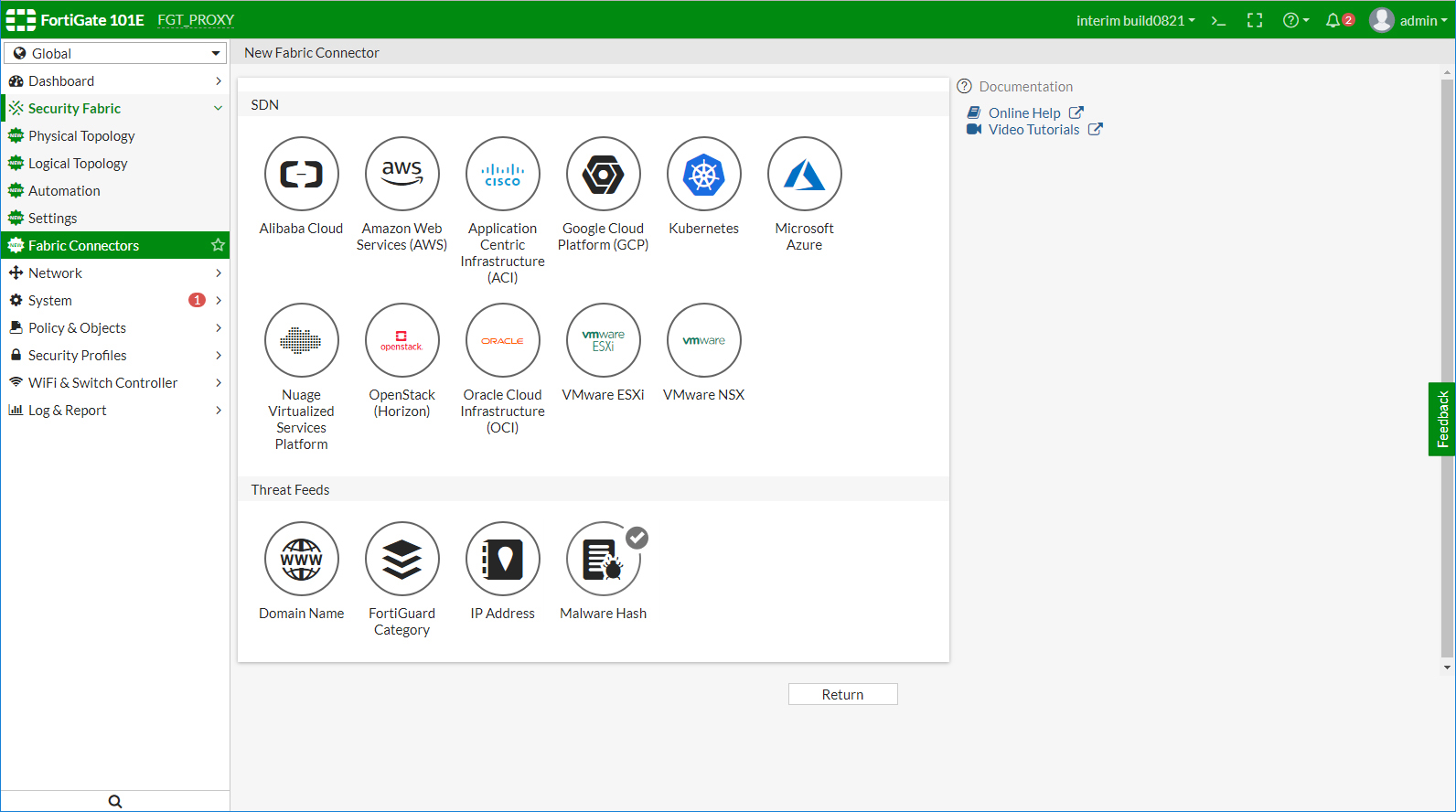
Step-by-step GUI guide
Navigate to Security Fabric > External Connectors > Create New > Threat Feeds > IP Address
| Field | Value |
|---|---|
| Name | ThreatIntel-IPFeed |
| URL | https://raw.githubusercontent.com/ziyadnz/threat-intel-ip-feeds/main/output/hourlyIPv4.txt |
| Refresh Rate | 60 minutes |
| Status | Enabled |
After saving, the feed should show a green status with the number of entries loaded under Security Fabric > External Connectors.
Navigate to Policy & Objects > Firewall Policy > Create New
| Field | Value |
|---|---|
| Name | Block-ThreatIntel |
| Incoming Interface | wan1 (or your WAN interface) |
| Outgoing Interface | any |
| Source | ThreatIntel-IPFeed |
| Destination | all |
| Action | DENY |
| Log Violation Traffic | Enabled |
Important: Place this policy above your allow rules so it takes priority.
Create a second policy to block internal hosts communicating with known malicious IPs (C2 callback detection):
| Field | Value |
|---|---|
| Name | Block-Outbound-ThreatIntel |
| Incoming Interface | lan / internal |
| Outgoing Interface | wan1 |
| Source | all |
| Destination | ThreatIntel-IPFeed |
| Action | DENY |
| Log Violation Traffic | Enabled |
FortiGate CLI alternative
config system external-resource
    edit "ThreatIntel-IPFeed"
        set type address
        set resource "https://raw.githubusercontent.com/ziyadnz/threat-intel-ip-feeds/main/output/hourlyIPv4.txt"
        set refresh-rate 60
    next
end

config firewall policy
    edit 0
        set name "Block-ThreatIntel"
        set srcintf "wan1"
        set dstintf "any"
        set srcaddr "ThreatIntel-IPFeed"
        set dstaddr "all"
        set action deny
        set schedule "always"
        set logtraffic all
    next
end
Full documentation: PAN-OS External Dynamic Lists

Step-by-step GUI guide
Navigate to Objects > External Dynamic Lists > Add
| Field | Value |
|---|---|
| Name | ThreatIntel-IPFeed |
| Type | IP List |
| Source | https://raw.githubusercontent.com/ziyadnz/threat-intel-ip-feeds/main/output/hourlyIPv4.txt |
| Repeat | Hourly |
Click OK to save.
Navigate to Policies > Security > Add
| Field | Value |
|---|---|
| Name | Block-ThreatIntel-Inbound |
| Source Zone | Untrust |
| Source Address | ThreatIntel-IPFeed |
| Destination Zone | any |
| Action | Drop |
| Log at Session End | Enabled |
| Log Forwarding | Select your log profile |
Important: Move this rule above your allow rules.
Add a second rule:
| Field | Value |
|---|---|
| Name | Block-ThreatIntel-Outbound |
| Source Zone | Trust |
| Source Address | any |
| Destination Zone | Untrust |
| Destination Address | ThreatIntel-IPFeed |
| Action | Drop |
| Log at Session End | Enabled |
Click Commit to apply changes. Verify the EDL is loaded under Objects > External Dynamic Lists — click the entry to see the number of IPs loaded.
Palo Alto CLI alternative
set address ThreatIntel-IPFeed external-dynamic-list url "https://raw.githubusercontent.com/ziyadnz/threat-intel-ip-feeds/main/output/hourlyIPv4.txt"
set address ThreatIntel-IPFeed external-dynamic-list type ip
set address ThreatIntel-IPFeed external-dynamic-list repeat hourly
curl -s https://raw.githubusercontent.com/ziyadnz/threat-intel-ip-feeds/main/output/hourlyIPv4.txt \
| while read ip; do iptables -A INPUT -s "$ip" -j DROP; donecurl -s https://raw.githubusercontent.com/ziyadnz/threat-intel-ip-feeds/main/output/hourlyIPv4.txt \
| nft add element inet filter blocklistUse as a persistent banlist in jail.local:
[threat-intel]
banaction = iptables-allports
bantime = 3600
findtime = 3600Generate rules from the feed:
curl -s https://raw.githubusercontent.com/ziyadnz/threat-intel-ip-feeds/main/output/hourlyIPv4.txt \
  | awk '{print "drop ip "$1" any -> any any (msg:\"ThreatIntel Block\"; sid:9000001; rev:1;)"}' \
> /etc/suricata/rules/threat-intel.rulesImport the raw URL as a threat intelligence feed (lookup table or CSV input).
The aggregator produces a STIX 2.1 JSON bundle at output/stix_bundle.json. Import it into any STIX-compatible platform:
import json
with open("output/stix_bundle.json") as f:
    bundle = json.load(f)
print(f"{len(bundle['objects']) - 1} indicators loaded")
# Each indicator includes: pattern, confidence score, source labels, categoryimport requests
blocklist = requests.get(
"https://raw.githubusercontent.com/ziyadnz/threat-intel-ip-feeds/main/output/hourlyIPv4.txt"
).text.strip().split("\n")
print(f"{len(blocklist)} IPs loaded")The CSV output at output/blacklist.csv includes per-IP metadata:
import csv
with open("output/blacklist.csv") as f:
    reader = csv.DictReader(f)
    multi_source = [r for r in reader if int(r["source_count"]) > 2]
print(f"{len(multi_source)} IPs flagged by 3+ sources")| Source | Type | Region | Registration |
|---|---|---|---|
| Spamhaus DROP / DROPv6 | CIDR blocklist | Global | None |
| Blocklist.de (7 categories) | Attack IPs | Global | None |
| CINS Army | Threat list | Global | None |
| Emerging Threats | Compromised IPs | Global | None |
| BinaryDefense | Artillery ban | Global | None |
| GreenSnow | Threat list | Global | None |
| Tor Exit Nodes | Anonymizer | Global | None |
| Stamparm IPsum | Multi-source aggregation | Global | None |
| SGB | Gov. threat feed | Turkey | None |
| RTBH | National blocklist | Turkey | None |
| AbuseIPDB | Crowd-sourced reports | Global | Free API key |
| AlienVault OTX | Pulse indicators | Global | Free API key |
Turkey-specific sources (SGB, RTBH) are rarely found in global aggregators - this project includes them natively.
| File | Format | Use Case |
|---|---|---|
hourlyIPv4.txt |
Raw IPs, one per line | Firewall / EDL import |
ipv4_blacklist.txt |
IPs + metadata header | Analysis / audit |
ipv6_blacklist.txt |
IPv6 addresses + CIDRs | IPv6-capable systems |
blacklist_full.json |
Full JSON dataset | API / programmatic use |
blacklist.csv |
CSV with per-IP metadata | SIEM enrichment / analysis |
stix_bundle.json |
STIX 2.1 JSON bundle | Threat intel platforms |
health_report.md |
Markdown report | Monitoring |
ip,type,is_cidr,sources,source_count,category,first_seen,last_seen
1.2.3.4,ipv4,False,Blocklist.de (ssh)|Stamparm IPsum,2,brute-force,2026-04-14T12:00:00+00:00,2026-04-14T12:00:00+00:00
5.6.0.0/16,ipv4,True,Spamhaus DROP,1,infrastructure,2026-04-14T12:00:00+00:00,2026-04-14T12:00:00+00:00| Column | Description |
|---|---|
ip |
IP address or CIDR range |
type |
ipv4 or ipv6 |
is_cidr |
True if CIDR range, False if individual IP |
sources |
Pipe-separated list of source names that reported this IP |
source_count |
Number of independent sources (higher = more confident) |
category |
Threat category derived from primary source |
first_seen / last_seen |
Timestamps of observation |
Each IP becomes a STIX indicator object with:
- Pattern:
[ipv4-addr:value = '1.2.3.4'](STIX pattern syntax) - Confidence: 0-100, scaled by number of reporting sources (20 per source, capped at 100)
- Labels: Threat category + source names
- Identity: Aggregator system as the producer
The health report (output/health_report.md) now includes source overlap analysis:
- How many IPs are unique to a single source vs. found in multiple sources
- Per-source contribution: unique IPs vs. overlapping IPs
- Top source-pair overlaps (which sources share the most IPs)
Prevent false positives by adding trusted IPs to whitelist.txt:
# CDN ranges — never block
104.16.0.0/12       # Cloudflare
8.8.8.8             # Google DNS
1.1.1.0/24          # Cloudflare DNS

# Our infrastructure
203.0.113.10
How it works:
- One IP or CIDR per line, comments start with
# - Individual IPs are filtered by exact match or CIDR containment
- CIDRs are filtered only if fully covered by a whitelisted range
- Supports both IPv4 and IPv6
- Whitelist stats appear in the health report and console summary
- The whitelist is applied before IPs enter the output files
This isn't a script that breaks silently. Every failure is tracked, reported, and isolated.
| Mechanism | What It Does |
|---|---|
| Async I/O | All 19 sources fetched concurrently via asyncio.gather + aiohttp — single event loop, no thread pool |
| Error Isolation | Each source runs as an independent coroutine. One failure never affects the other 17+ |
| Auto Retry | Failed requests retry 3x with exponential backoff (2s, 4s, 8s) using aiohttp. Permanent 4xx errors skip retry |
| Rollback Protection | If success rate drops below 20%, existing output files are preserved — not overwritten with bad data |
| Health Tracking | source_health.json records every run: consecutive failures, last success, IP counts |
| Stale Detection | Sources with no data for 30+ days are flagged |
| GitHub Issue Alerts | Auto-creates issues on failure, auto-closes on recovery |
| Exit Codes | 0 = OK, 1 = partial failure (output written), 2 = critical (output preserved) |
| IP Whitelisting | Trusted IPs/CIDRs in whitelist.txt are never included in output |
| Dedup Metrics | Source overlap analysis helps identify redundant or low-value sources |
git clone https://github.com/ziyadnz/threat-intel-ip-feeds.git
cd threat-intel-ip-feeds
pip install -r requirements.txt
python run.py
Requires Python 3.10+ (for
asyncio.runand modern type hints).
export ABUSEIPDB_API_KEY="your_key"    # https://www.abuseipdb.com/register
export OTX_API_KEY="your_key"          # https://otx.alienvault.com
python run.py0 * * * * cd /path/to/threat-intel-ip-feeds && python run.py >> /var/log/threat-intel.log 2>&1pip install -r requirements.txt
python -m pytest tests/unit/ -vThe test suite (80 tests, 0.2s) covers:
- Domain entities, value objects, and services (pure logic, zero I/O)
- Use case orchestration with stub ports (async)
- aiohttp client retry logic with mocked HTTP
- Source parsing with async fake HTTP client
- CSV, STIX, raw, JSON output format correctness
- Rollback protection and health tracking
flowchart TD
    A[Start - Every Hour] --> B[Load Whitelist + Health State]
    B --> C[Launch 21 async coroutines via asyncio.gather]
    C --> D{aiohttp Request}
    D -->|Success| E[Extract & Validate IPs]
    D -->|Fail| F{Retry < 3?}
    F -->|Yes| G[Async backoff 2s/4s/8s] --> D
    F -->|No| H[Record Failure]
    E --> I[Record Success]
    H --> WF[Apply Whitelist Filter]
    I --> WF
    WF --> J[Classify IPv4 / IPv6 + Track Source Attribution]
    J --> K{Success Rate >= 20%?}
    K -->|Yes| L[Write Output Files]
    K -->|No| M[Rollback: Keep Existing Files]
    L --> L1[hourlyIPv4.txt]
    L --> L2[blacklist.csv]
    L --> L3[stix_bundle.json]
    L --> L4[blacklist_full.json]
    L1 & L2 & L3 & L4 --> N[Health Report + Dedup Metrics]
    M --> N
    N --> O{Issues Detected?}
    O -->|Yes| P[Open GitHub Issue]
    O -->|No| Q[Auto-Close Resolved Issues]
graph LR
    subgraph Sources
        GS[Global Sources<br/>15 feeds]
        TS[Turkey Sources<br/>SGB, RTBH]
        AS[API Sources<br/>AbuseIPDB, OTX]
    end

    subgraph Core
        CO[CollectThreatIntelUseCase<br/>asyncio.gather Concurrency<br/>+ Source Attribution]
        UT[AiohttpClient<br/>Async HTTP + Retry]
        CF[AppConfig<br/>Env-based Settings]
        WL[WhitelistFilter<br/>Domain Service]
    end

    subgraph Output
        OW[output_writer.py<br/>Rollback Protected]
        IPv4[ipv4_blacklist.txt]
        IPv6[ipv6_blacklist.txt]
        JSON[blacklist_full.json]
        CSV[blacklist.csv<br/>Per-IP Metadata]
        STIX[stix_bundle.json<br/>STIX 2.1 Bundle]
    end

    subgraph Health
        HT[health_tracker.py<br/>Persistent State]
        HR[health_report.py<br/>Markdown Report<br/>+ Dedup Metrics]
        NO[notifier.py<br/>GitHub Issues]
    end

    subgraph Tests
        TS2[tests/unit/<br/>80 async tests<br/>Mocked aiohttp]
    end

    MAIN[main.py<br/>Orchestrator] --> CO
    CO --> GS & TS & AS
    GS & TS & AS --> UT
    UT --> CF
    CO --> WL
    CO --> OW
    OW --> IPv4 & IPv6 & JSON & CSV & STIX
    CO --> HT
    HT --> HR
    HR --> NO
Issues and pull requests are welcome. If you know a free, public threat intel feed that's missing, open an issue.
MIT