Hugo Nuo is an responsive light & clean hugo theme for blogger. This theme features several page layout, like an about page for your portfolio, a links page for your friends' blog, a tags page for your tags cloud, a works page is under development. This theme makes many third-party hugo shortcodes, including Codepen, JSFiddle, Video.js, Music 163 and Sheng Xiang, Asciinema.
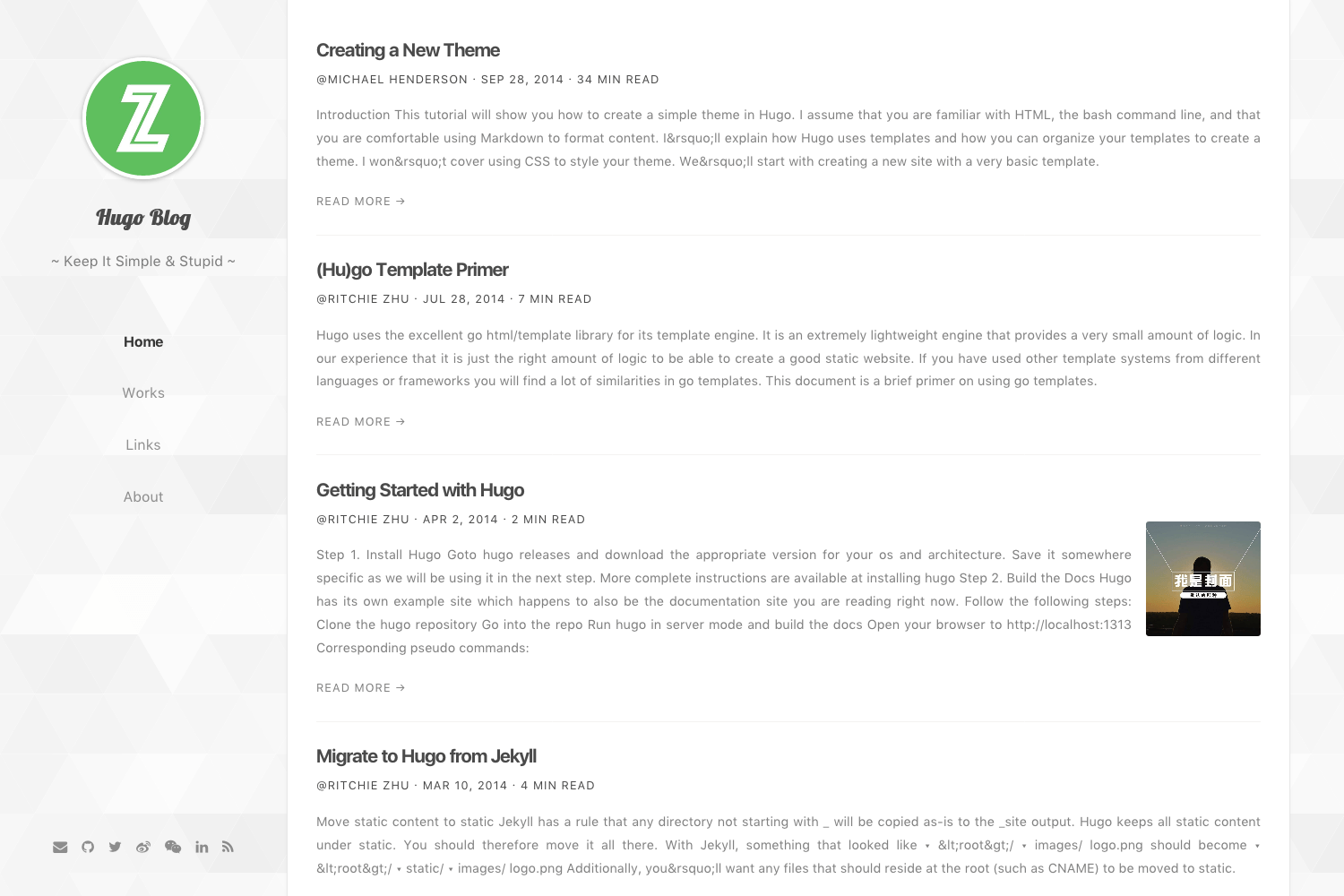
Or you want → A Real Site Demo | Hugo Nuo Theme Post Preview
Inside the folder of your Hugo site run:
$ cd themes
$ git clone https://github.com/laozhu/hugo-nuo
For more information read the official setup guide of Hugo.
After installing the hugo-nuo theme successfully it requires just a few more steps to get your site finally running.
Take a look inside the exampleSite folder of this theme. You'll find a file called config.toml. To use it, copy the config.toml in the root folder of your Hugo site. Feel free to customize this theme as you like.
Main Menu
The hugo-nuo theme add home, works and tags page to initial site menu, you can add your own menu item here.
[[menu.main]]
  name = "Home"
  weight = 10
  identifier = "home"
  url = "/"

[[menu.main]]
  name = "Works"
  weight = 20
  identifier = "works"
  url = "https://github.com/laozhu"

[[menu.main]]
  name = "Tags"
  weight = 30
  identifier = "tags"
  url = "/tags/"
Or you can add some other page to menu in page's front matter:
---
title: "Links"
date: 2017-08-02
layout: "links"
menu: "main"
weight: 40
---
Social Networks
The following social network icons are available:
[params]
  email = "[email protected]"
  github = "github_username"
  twitter = "twitter_username"
  linkedin = "linkedin_username"
  weibo = "weibo_username"
  wechat= "/static/images/qrcode.jpg" # Replace with your wechat qrcode image
  facebook = "facebook_username"
  google = "googlplus_id_number"
  instagram = "instagram_username"
  youtube = "youtube_username"
  vimeo = "vimeo_username"
  medium = "medium_username"
  quora = "quora_username"
  pinterest = "pinterest_username"
  dribbble = "dribbble_username"
  behance = "behance_username"
  jsfiddle = "jsfiddle_username"
  codepen = "codepen_username"
  zhihu = "zhihu_username"
  douban = "douban_username"
  bilibili = "bilibili_id_number"
You can choose someone to display, the recommend number is 7 icons.
SEO
The hugo-nuo theme support Google, Bing, Baidu, Sogou, 360 webmaster's meta verification tool, you can activate as required. The seotitle and description will show in search results and browser title.
[params]
  seotitle = "Hugo Blog Title (SEO Version)"
  description = "Hugo is one of the most popular open-source static site generators. With its amazing speed and flexibility, Hugo makes building websites fun again."

  # Google Webmaster
  # https://www.google.com/webmasters/
  googleSiteVerification = "google_site_verification_code"

  # Bing Webmaster
  # https://www.bing.com/toolbox/webmaster/
  msValidate = "bing_site_verification_code"

  # Baidu Webmaster (China Only)
  # https://zhanzhang.baidu.com/
  # baiduSiteVerification = "baidu_site_verification_code"

  # Sogou Webmaster (China Only)
  # http://zhanzhang.sogou.com/
  # sogouSiteVerification = "sogou_site_verification_code"

  # 360 Webmaster (China Only)
  # http://zhanzhang.so.com/
  # soSiteVerification = "360_site_verification_code"
Website Analytics
The hugo-nuo theme support Google Analytics and Baidu Tongji, In China you can choose both Baidu Tongji and Google Analytics.
# Google Analytics UA number
googleAnalytics = "UA-XXXXXXXX-X"

[params]
  # Baidu Tongji (China Only)
  # https://tongji.baidu.com/
  baiduTongji = "baidu_tongji_code"
Social Comments
The hugo-nuo theme support Disqus and Chang Yan social comment system, In China you can choose Chang Yan because Disqus is blocked by GFW.
# Disqus Username
disqusShortname = "disqus_shortname"

[params]
  # Changyan Comments (China Only)
  Changyan = false
  ChangyanId = "your_changyan_id"
  ChangyanConf = "your_changyan_conf"
The works page layout is under development, you can use github homepage for replacement temporarily.
[[menu.main]]
  name = "Works"
  weight = 20
  identifier = "works"
url = "https://github.com/your_github_username"Thanks to @bwangelme's great PR, the tags page has been done, you can use this page by adding it to main menu.
[[menu.main]]
  name = "Tags"
  weight = 30
  identifier = "tags"
url = "/tags/"Inside the folder of your Hugo site run:
$ hugo new links.md
$ mkdir data && touch data/links.yml
$ mkdir -p content/media/links
$ vim content/links.md
Change the content of links.md, set page layout to links, If you want to add about page to menu, set menu to main and weight to 40.
---
title: "Links"
date: 2017-08-02
layout: "links"
menu: "main"
weight: 40
---
The links page read data from data/link.yml file, now you can add friend's links there. The format looks like:
- title: chekun's blog
  link: https://chekun.me
  avatar: /media/links/chekun.jpg
  description: A full-stack PHP developer

- title: Boof Wang
  link: http://boof.wang
  avatar: /media/links/wangbo.jpg
  description: Another full-stack PHP developer
The links page need friend's avatar, finally you should add friend's avatar to content/media/links directory and link to avatar in the links.yml file.
Inside the folder of your Hugo site run:
$ hugo new about.md
$ vim content/about.md
Change the content of about.md, set page layout to about, If you want to add about page to menu, set menu to main and weight to 50.
---
title: "About"
date: 2017-08-02
layout: "about"
menu: "main"
weight: 50
comments: false
---

Write something about you here.
Write your portfolio as a post here, if you want comments in about page, you should turn comments to true.
Inside the folder of your Hugo site run:
$ hugo new resume.md
$ cat << EOF > content/resume.md
---
title: "Resume"
date: 2017-12-01
layout: "resume"
---
EOF
Then create a file at data/resume.toml, where the resume page reads data from.
You can reference
exampleSite/data/resume.toml
for how to construct your resume.
The resume page will be located at /resume off your website root. Different
from the about page, the resume page is intended as a one pager that you
can print out for job hunting.
⚠️ Big Changenpm => yarn
rollup => webpack
SASS => PostCSS
In the new build system, I use webpack to generate dist files and a manifest.json file which lists all dist scripts and styles, then I use hugo data template to read the manifest.json content and insert them into the html layout. In this way I can use webpack chunkHash for browser cache and I don't need to change the layout.
# Install all dependences
$ cd themes/hugo-nuo
$ yarn

# Development watch
$ yarn dev

# Build static files for production
$ yarn build

# Scripts lint and autofix
$ yarn eslint
$ yarn eslint:fix

# Styles lint and autofix
$ yarn stylelint
$ yarn stylelint:fix

# Minify images
$ yarn imagemin

# Clean
$ yarn clean
I use ImageOptim to make images load faster, you should install this app before you run yarn imagemin script.
From Hugo 0.28, the default syntax hightlighter in Hugo is Chroma; it is built in Go and is really, really fast – and for the most important parts compatible with Pygments.
$ hugo gen chromastyles --style=monokai > ./src/styles/partials/syntax.cssRun hugo gen chromastyles -h for more options. See https://help.farbox.com/pygments.html for a gallery of available styles.
In order to see your site in action, run Hugo's built-in local server.
$ hugo server -wNow enter localhost:1313 in the address bar of your browser.
Also thanks to Steve Francia for creating Hugo and the awesome community around the project.