The package is still in development.
fMRI-QCtoolkit is a modular Python package for fMRI (functional Magnetic Resonance Imaging) quality control (QC), integrating quantitative metrics from MRIQC, fMRIPrep, and AFNI, along with manual scoring. The package includes an interactive dashboard with customizable filters and visualizations, a lightweight front-end for manual rating for fMRIPrep, and supports batch-level scoring for both fMRIPrep and AFNI outputs.

- Create or activate a virtual environment.
- Prepare the package code (clone or download the repository).
- Navigate to the root folder containing pyproject.toml and install the package.
cd /path/to/your/package

pip install .

# Or developmental mode
# pip install -e .[dev]After the completion of preprocessing, perform qualitative scoring on the derivatives.
AFNI provides scripts for browsing multiple subjects' QC files. However, using firefox on HPC (High-performance computing) systems may result in issues interacting with buttons, so this using open_apqc.py is another option (while ensuring the required Python packages are activated in the environment).
The directory structure of AFNI derivatives is as follows:
.
└── AFNI_derivatives/
    ├── sub-001/
    │   └── ses-01/
    │       └── cards_output/
    │           └── sub-001.results/
    │               ├── QC_sub-001
    │               └── ...
    ├── sub-002
    ├── sub-003
    └── ...
Input Arguments:
qc rating afni: Indicate which rating program.--input-dir: Root directory, containing results that preprocessed from different participants.--subjects: Support input multiple participants IDs.--task: Rating program will searchtaskininput-dirto find theQC_{subj}--prefix: The prefix of participants IDs.
Example Synatx:
qc rating afni --input-dir /PATH/AFNI_derivatives --subjects "003,009" --task ses-01/cards --prefix sub-Although I've tried to make the scoring criteria flexible, it may still not support all pathfinding scenarios. Therefore, you can also try script version.
Important
The rating program relies on the open_apqc.py tool developed by AFNI.
You can either:
- Change the default AFNI binary path in
fMRI_QCtoolkit/cli.py, or - Provide a custom path using the
--afni-pathoption when running the command.qc rating afni --input-dir /PATH/AFNI_derivatives --subjects "003,009" --task ses-01/cards --prefix sub- --afni-path /PATH

The rating module in fMRI-QCtoolkit is based on the HTML reports generated by fMRIPrep (e.g., sub-{ID}.html).
Each QC item maps directly to specific sections of the original fMRIPrep report.
- Brain mask and brain tissue segmentation of the T1w (T1mask)
- Spatial normalization of the anatomical T1w reference (Norm)
- Surface reconstruction (SurfRecon)
- Susceptibility distortion correction (SDC)
- Alignment of functional and anatomical MRI data (coregistration) (Align)
- Brain mask and (anatomical/temporal) CompCor ROIs (CompCor)
- Variance explained by t/aCompCor components (Variance)
- BOLD Summary (BOLD)
- Correlations among nuisance regressors (Corr)
The interface is divided into two parts:
- Upper panel: navigate modules with a left-click; scroll horizontally with the mouse wheel.
- Lower panel: interactive rating area, similar to AFNI’s APQC HTML.
- Left-click to rate, Ctrl+click to add comments.
- Rating buttons toggle between: good (+, green), bad (×, red), and other (?, yellow).
- Results are saved automatically as CSV files (subject-level and task-level). Upon reopening the program with the same code, it will automatically retrieve the previous scores by extracting the subject-level CSV file.
Important
If the program cannot detect the session and run number, both will default to 1. For example, the saved CSV file name would be sub-{ID}_ses-01_rest.csv. Therefore, when merging with files generated by MRIQC, you need to modify the ses parameters.
The directory structure of fMRIPrep derivatives is as follows:
.
└── fMRIPrep_derivatives/
    ├── sub-001
    ├── sub-001.html
    ├── sub-002
    ├── sub-002.html
    ├── sub-003
    ├── sub-003.html
    ├── dataset_description.json
    ├── desc-aparcaseg_dseg.tsv
    ├── desc-aseg_dseg.tsv
    └── ...
Input Arguments:
qc rating fmriprep: Indicate which rating program.--input-dir: Root directory, containing results that preprocessed from different participants.--subjects: Support input multiple participants IDs.--output-dir: Path for exporting the scoring CSV file.
Example Synatx:
qc rating fmriprep --input-dir /PATH/fMRIPrep_derivatives --output-dir /PATH/Output_dir --subjects "1013,1026"
By extracting information from qualitative rating files, qc prep program then generates two dataframes to put into the dashboard.
After finishing preprocessing and rating, both quantitative and qualitative rating information are saved in QC_{subj}/extra_info/out.ss_review.{subj}.json.
Input Arguments:
qc prep afni: Indicate which rating program.--input-dir: Root directory, containing results that preprocessed from different participants.--output-dir: Path for exportingdf_final.csvandlollipop_chart_data.csvfiles.--task: Prep program will searchtaskininput-dirto find theQC_{subj}/extra_info/out.ss_review.{subj}.jsonacross all participants.--prefix: The prefix of participants IDs.
Example Synatx:
qc prep afni --input-dir /PATH/AFNI_derivatives --task ses-01/kidvid --output-dir /PATH/Output_dir --prefix sub-Note
The quantitative parameters are extracted and coded according to the following standards. Users may also modify JSON file and status file based on their own requirements.
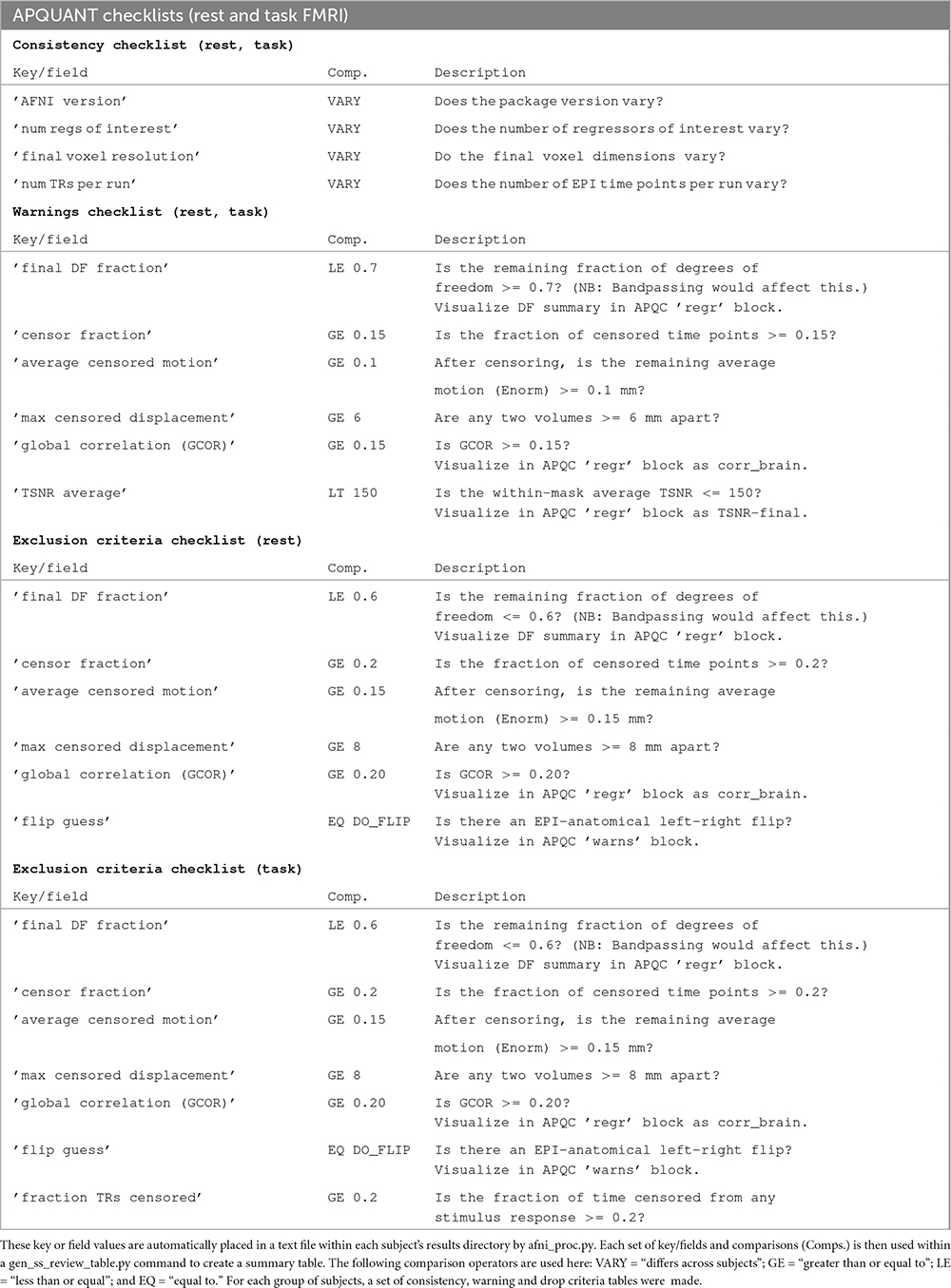
After finishing rating procedure, merge the qualitative rating files with quantitative file (group_bold.tsv) that generates by MRIQC, and output two dataframes to put into dashboard.
Input Arguments:
qc prep fmriprep: Indicate which rating program.--bold-file: Inputgroup_bold.tsvfile that generated by MRIQC.--rating-dir: Path for storing fMRIPrep qualitative scores.--task: Indicate which task's rating data you want to use.--output-dir: Path for exportingdf_final.csvandlollipop_chart_data.csvfiles.
Example Synatx:
qc prep fmriprep --bold-file examples/example_data/fmriprep/group_bold.tsv --rating-dir examples/example_data/fmriprep/ --task rest --output-dir /examples/example_data/fmriprep/Note
The quantitative parameters are extracted from here and coded according to the following standards. Users may also modify JSON file and status file based on their own requirements.
Visualize, filter, and export selected data.
The left side of the dashboard features filter sidebars where users can select the desired ranges. The two central tabs display data tables and visualizations (heatmaps and lollipop charts). After selecting rows in the data table, the blue download button below allows exporting the corresponding data frame.


Input Arguments:
qc dashboard afni: Indicate which rating program.--data-file: Input the merged dataframe.--lollipop-file: Input the data for lollipop chart.--task: Specify the task name to be used when downloading data.
Example Synatx:
qc dashboard afni --data-file examples/example_data/afni/df_final.csv --lollipop-file examples/example_data/afni/lollipop_chart_data.csv --task kidvidInput Arguments:
qc dashboard fmriprep: Indicate which rating program.--data-file: Input the merged dataframe.--lollipop-file: Input the data for lollipop chart.--task: Specify the task name to be used when downloading data and filtering task in the merged dataframe.
Example Synatx:
qc dashboard fmriprep --data-file examples/example_data/fmriprep/df_final.csv --lollipop-file examples/example_data/fmriprep/lollipop_chart_data.csv --task restWe have summarized the AFNI QC training documentation based on existing literature and included several case studies (still under revision).
Note
- The data prep feature is designed for users unfamiliar with Python. If you want more flexible data wrangling, try the scripts (or write your scripts).
- The sidebar and visualizations are highly customizable, as long as the input dataframe contains the corresponding data. By configuring AFNI and fMRIPrep config files, as well as asign status to variables, users can customize filters and the items displayed in visualizations.
Coming soon!
- Cox R. W. (1996). AFNI: software for analysis and visualization of functional magnetic resonance neuroimages. Computers and biomedical research, an international journal, 29(3), 162–173. https://doi.org/10.1006/cbmr.1996.0014
- Cox, R. W., & Hyde, J. S. (1997). Software tools for analysis and visualization of fMRI data. NMR in biomedicine, 10(4-5), 171–178. https://pubmed.ncbi.nlm.nih.gov/9430344/
- Esteban, O., Birman, D., Schaer, M., Koyejo, O. O., Poldrack, R. A., & Gorgolewski, K. J. (2017). MRIQC: Advancing the automatic prediction of image quality in MRI from unseen sites. PloS one, 12(9), e0184661. https://doi.org/10.1371/journal.pone.0184661
- Esteban, O., Ciric, R., Finc, K. et al. Analysis of task-based functional MRI data preprocessed with fMRIPrep. Nat Protoc 15, 2186–2202 (2020). https://doi.org/10.1038/s41596-020-0327-3
- Harris, C.R., Millman, K.J., van der Walt, S.J. et al. Array programming with NumPy. Nature 585, 357–362 (2020). https://doi.org/10.1038/s41586-020-2649-2
- Kruchten, N., Seier, A., & Parmer, C. (2025). An interactive, open-source, and browser-based graphing library for Python (Version 6.3.1) [Computer software]. https://doi.org/10.5281/zenodo.14503524
- Pallets. (2025). Flask (Version 3.1.1) [Computer software]. PyPI. https://palletsprojects.com/
- Parmer, C., Duval, P., & Johnson, A. (2025). A data and analytics web app framework for Python, no JavaScript required. (Version 3.2.0) [Computer software]. https://doi.org/10.5281/zenodo.14182630
- Ramírez, S. (2025). Typer (Version 0.19.2) [Computer software]. https://github.com/fastapi/typer
- Reynolds, R. C., Taylor, P. A., & Glen, D. R. (2023). Quality control practices in FMRI analysis: Philosophy, methods and examples using AFNI. Frontiers in Neuroscience, 16, 1073800. https://doi.org/10.3389/fnins.2022.1073800
- The pandas development team. pandas-dev/pandas: Pandas [Computer software]. https://doi.org/10.5281/zenodo.3509134