UX Improvements to shareable certificates#1387
Conversation


templates/content-certificate.php
Outdated
| <?php endif; ?> | ||
|
|
||
| <?php if ( $is_sharing_enabled ) : ?> | ||
| <span class="llms-button-secondary"> |
There was a problem hiding this comment.
I was envisioning a read-only text input in favor of a button that doesn't do anything when clicked.
There was a problem hiding this comment.
Hi, I thought the proposal mention "When sharing is enabled, a read-only text input should be output with the certificate's URL populated in it. "?

There was a problem hiding this comment.
Hi @imknight ,
yes so in place of this <span> that looks like a button, @thomasplevy was envisioning a read-only text input, as mentioned in the proposal.
Is that anything I'm missing?!
There was a problem hiding this comment.
oh got it, finally, I understand, will update the code.
I can change it into input easily, but need some tweak on styles, shall it combine within this change request?
can't really get the gulp working, any documentation that I can read about workflow to tweak the style?
There was a problem hiding this comment.
Have you had a look at our Installing for Development Docs: https://github.com/gocodebox/lifterlms/blob/trunk/docs/installing.md
There was a problem hiding this comment.
The CSS is probably less important than making sure this fundamentally works. Although now that I'm looking at this again we're going to need to add some UX to the field too...
I'm sure anyone who sees a field is also going to expect the following:
- When you click the field it should highlight everything
- There should be a "Copy" button next to the field
So we'll need to add some JS to this to power the UX
There was a problem hiding this comment.
I got it for 2 so that if a user clicks on the copy button, it will copy the permalink to the clipboard, but what is 1 about? highlight everything?
There was a problem hiding this comment.
Instead of having to double click (or single click and then ctrl/cmd + a) to highlight the whole link, it would be simpler for the end user for them to click once in the field and have the entire contents of the field automatically selected/highlighted.
Here's a quick gif of how google drive handles this (you maybe can't tell but I'm just clicking the field and it automatically highlights the whole contents)
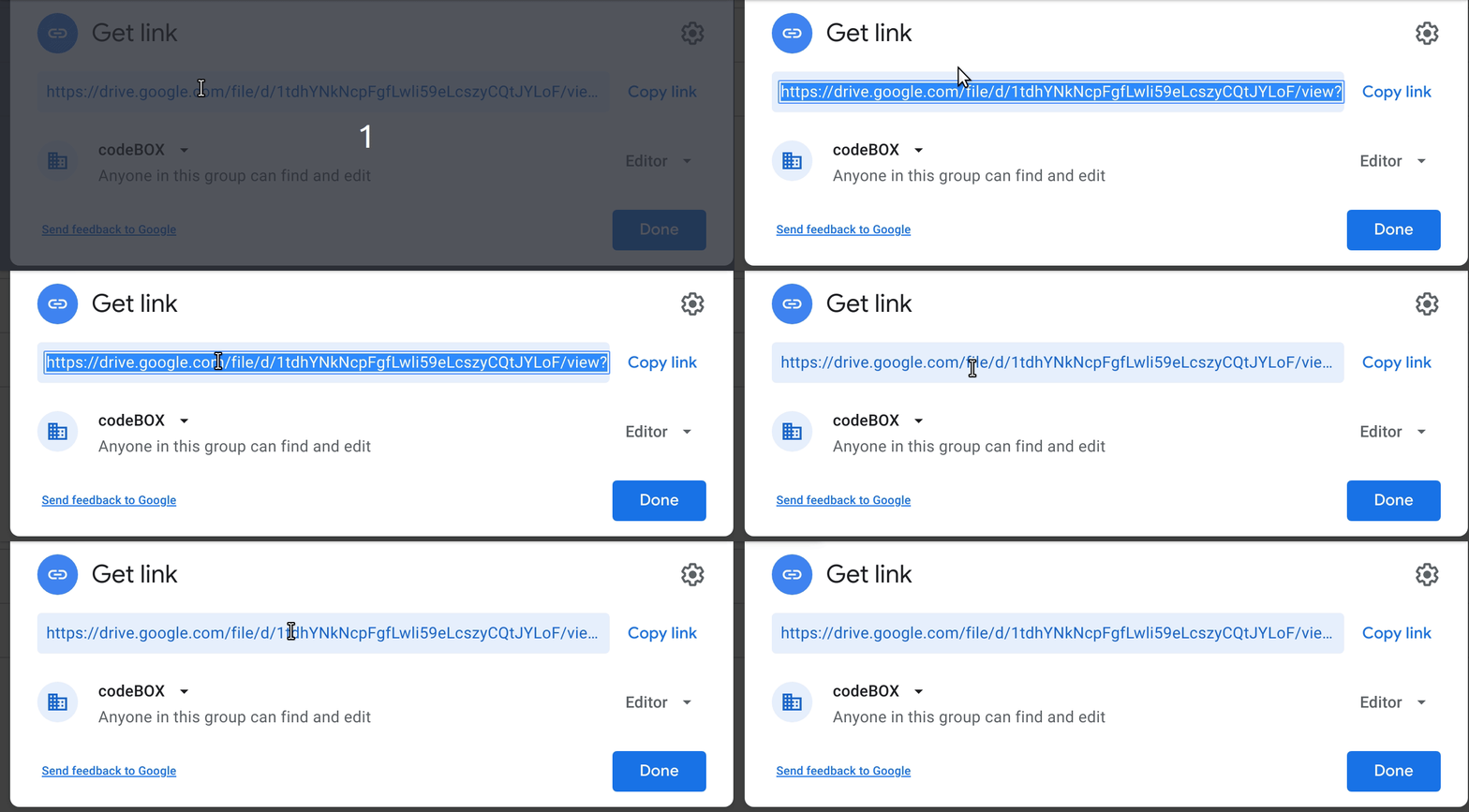
I find that most apps that let you copy a link have this behavior automatically so if we don't do it we'll get support requests about how it doesn't work right, almost guaranteed.
Thanks!
There was a problem hiding this comment.
Also, just to test the concept, it can be done pretty simply with some JS like this:
document.getELementById( 'test-input' ).addEventListener( 'focus', e => {
     e.target.select();
} );
 thomasplevy
left a comment
thomasplevy
left a comment
thomasplevy
left a comment
There was a problem hiding this comment.
Sorry @imknight and thanks for your patience on this one.
I'm not a huge fan of doing an inline script like this on a client-facing page. We make concessions sometimes but this doesn't feel like a good place to do it.
Especially because on a closer inspection I think we can do it with a oneliner on the input itself...
onfocus="this.select()" I think does it, right?
Then we don't have to have an inline <script> tag and we don't have to add a JS asset specifically for this purpose.
Script event handler attributes aren't that attractive and I also like to avoid them but in this case I think there's a good argument for using them.
What do you think?
And, again, thanks for your patience!
|
ok, will try to work on oneliner script, I thought for a template is good to use the inline script. |
thomasplevy
left a comment
thomasplevy
left a comment
There was a problem hiding this comment.
I've been holding on this because now that the initial work is complete I think additional UI work is needed before this can be shipped.
- A copy button is still needed. This adds some complexity due to the nature of copying to the clipboard via browser interactions. It will require a JS file to be included on the certificate to power the UI.
- Looking at line of buttons makes me realize that we need to change our strategy on how this content is output below the certificate. I don't have a good solution in mind so I don't know how to push this forward. What I'm seeing today doesn't look right with the input (and then later a new button from 1 above) but I don't have any alternatives in mind.
Thank for your work thus far @imknight, we'll get this merged in at some point but at this moment this isn't a high-enough priority item for us to take over internally and since I don't know exactly what direction to move in I don't know how to properly relay this to you.
I need to spend some design time here and I don't have that capacity right now.
Thanks,
|
noted and thank |
 thomasplevy
added
the
hacktoberfest
thomasplevy
added
the
hacktoberfest


Co-authored-by: Thomas Patrick Levy <thomasplevy@gmail.com>

|
We may want to add a "Copy to Clipboard" link/button (see Advanced Coupons UI for accessible suggestions on how to do this), but otherwise making it clear that they need to share the current URL looks good. Test to make sure UI looks reasonable, potentially add copy to clipboard, then merge. |
|
Added screenshot. Awaiting approval or if we want to re-work the design a bit. |


|
After discussion, switched text input to a button that, when clicked, copies the URL to the clipboard. |

|
lol from 2020 until now, finally see it merge! |

5 participants


Description
Fixes #1379
How has this been tested?
Screenshots
Checklist: