Release Date: January 27, 2026 Pieces Desktop: 5.0.1 PiecesOS: 12.3.6
It's 5:47 PM. You need to submit your billable hours, but the day is a blur—client calls, code reviews, context switches. You open your calendar, scan Slack, check your browser history... and still can't account for two hours.
Pieces 5.0.1 fixes that. This release introduces Time Breakdown, a single-click summary that reconstructs your billable hours automatically from your captured workstream. No more guessing. No more lost revenue.
Every professional who bills by the hour knows the end-of-day scramble. Studies show that poor recall costs professionals 10–20% of their billable time. That's real money left on the table—every single day.
Time Breakdown gives you a head start. With one click, Pieces analyzes your captured workstream context and generates a reconstruction of your day—a foundation you can review, refine, and build on:
- Approximate time blocks showing when you worked on what
- Project and client groupings to help organize your billing
- Activity descriptions that jog your memory on the details
- Editable entries so you can adjust, add context, and finalize
Think of it as your memory assistant—not a replacement for your judgment, but a way to stop starting from a blank page. The output gives you something to react to, refine, and submit with confidence.
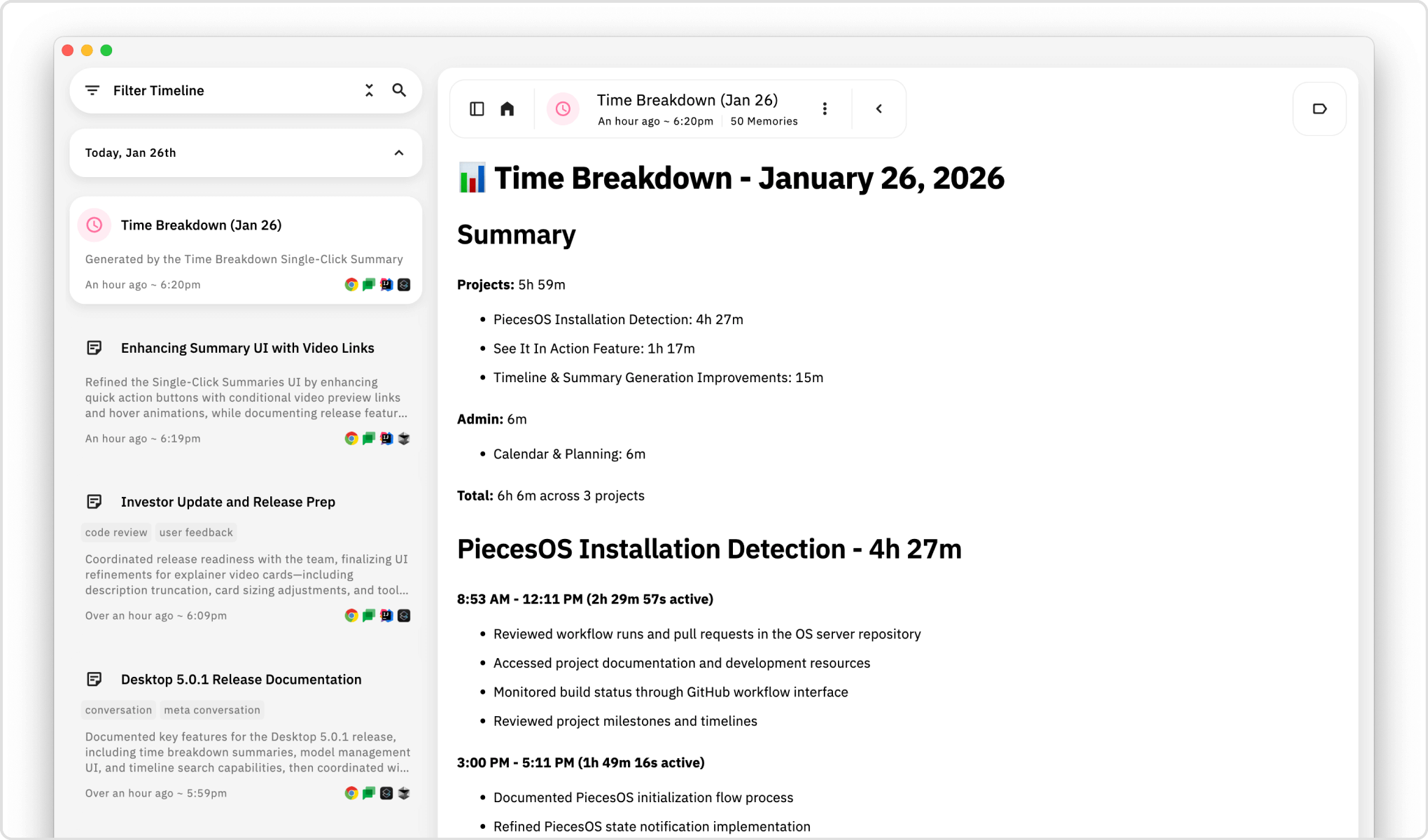
A Time Breakdown output: time blocks across projects with activity descriptions to help you recall the details.
| If you're a... | Time Breakdown helps you... |
|---|---|
| Attorney | Reconstruct billable blocks and jog your memory on case details before logging time |
| CPA or Accountant | See how your day split across clients and projects—a starting point for accurate entries |
| Consultant | Get a per-client breakdown that you can refine for T&M billing |
| Government Contractor | Build documentation for time & materials with a structured starting point |
| Researcher | Recall which activities tied to which sponsored projects—especially valuable come tax season when tracking R&D spend for tax credits |
End of day: Generate a Time Breakdown. Review what Pieces captured, fill in gaps, adjust as needed. Submit your hours without starting from scratch.
Invoice prep: Pull Time Breakdowns as a foundation for billing cycles. Refine the narratives, then finalize.
Memory jogger: Can't remember what happened at 2 PM? Time Breakdown surfaces the context so you can investigate further.
Time Breakdown v1 gives you a strong starting point. With each release, we're improving accuracy, expanding context sources, and refining the output. What you see today will get meaningfully better—and we're excited to keep building on this foundation.
Coming soon:
- Custom time range selection — Generate breakdowns for specific windows, not just full days
- Direct CSV exports — One-click export for legal billing systems, PSA tools, and time tracking platforms
You know that conversation happened. You remember roughly when. But where is it?
Your Timeline is now searchable and filterable—so you can find exactly what you're looking for in seconds.
Type a project name, topic, or phrase into the new search bar and instantly surface relevant summaries, conversations, and context. Results are grouped by date with preview snippets, so you can spot what you need at a glance.
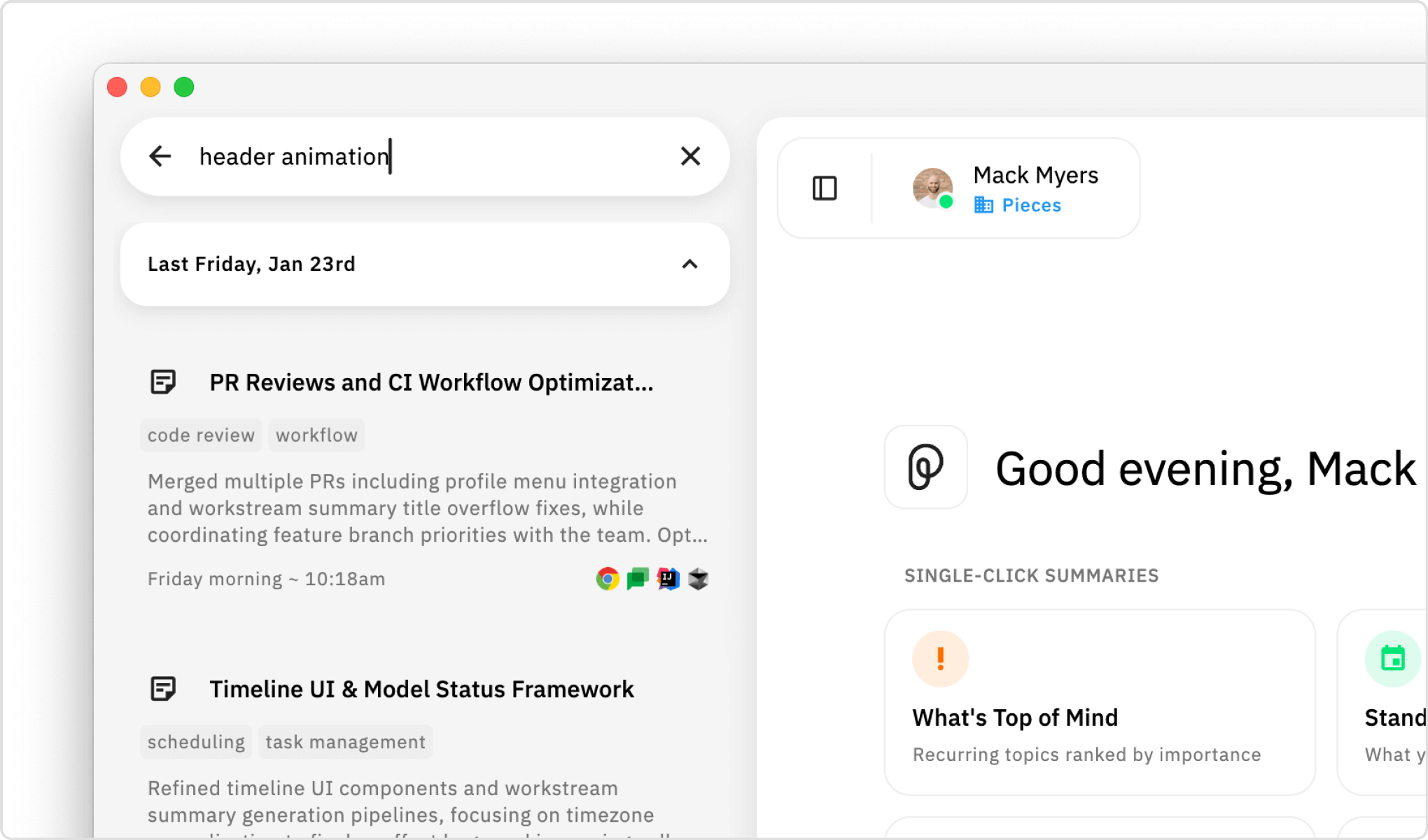
Searching for "header animation" surfaces relevant summaries grouped by date.
Remember it happened "sometime Friday afternoon"? Scope your Timeline to exactly that window:
- Just now / Last couple minutes — For recent lookback
- This afternoon / This morning — When you know the rough timeframe
- Today / This week — For broader exploration
- Custom ranges — When you need precision
Combine time filters with source filters (which apps contributed context) and summary type filters (Day Recap, Standup, Time Breakdown) to slice through your history.

Time Ranges let you scope to exactly when something happened—no more endless scrolling.
This is the first of many search enhancements. Cross-entity search, semantic filtering, and deeper retrieval are coming in future releases.
Different tasks need different models. Sometimes you want Claude's nuanced reasoning; other times you need Gemini's speed. The new model picker makes switching effortless.
A clean dropdown shows your enabled models with inline descriptions. Use the quick search at the top to find the model you need instantly. See what each model is good for, pick the one you need, and keep working.
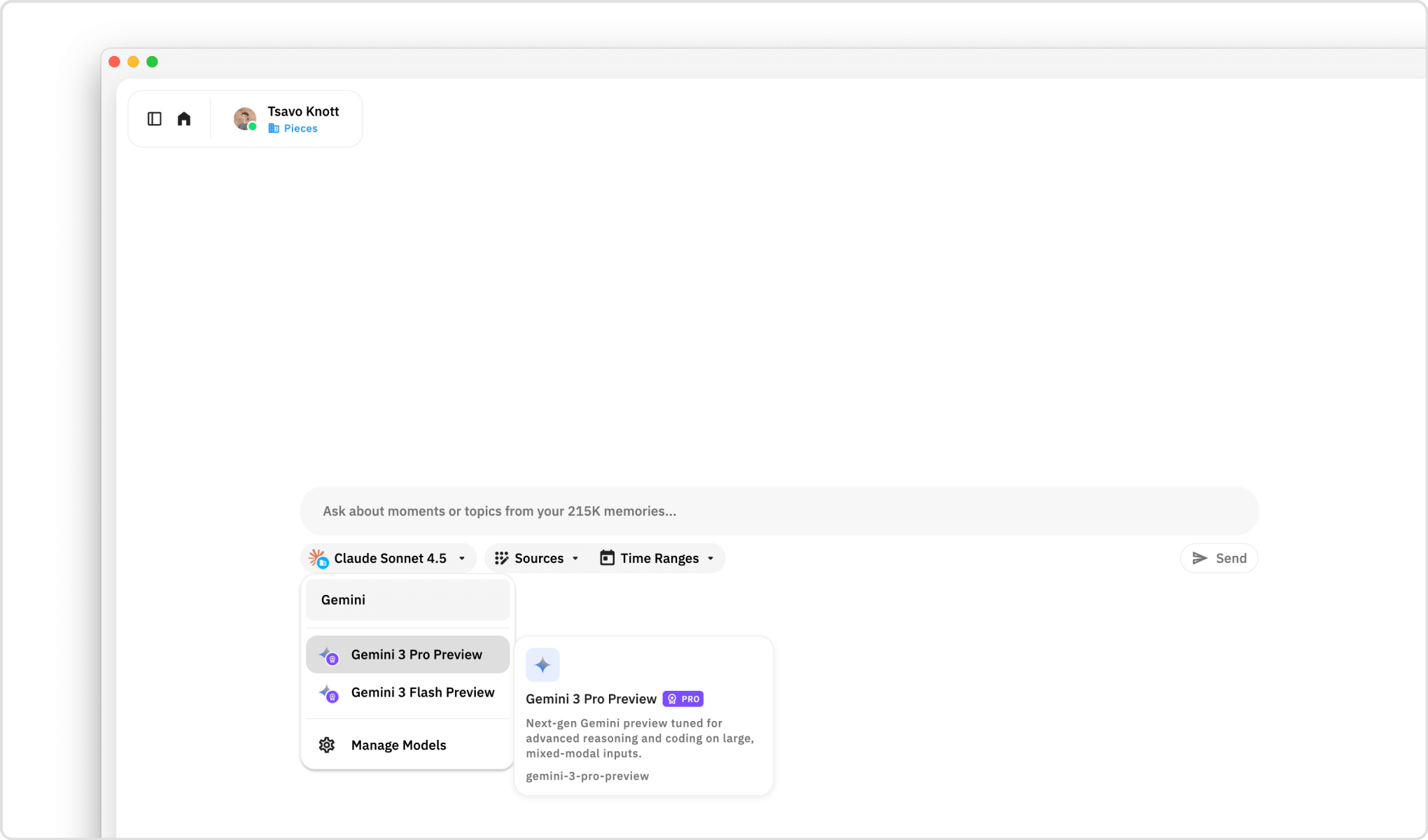
Switch models mid-conversation with a dropdown that tells you what each one does.
Full model management has moved to a dedicated section in Settings. You can get there directly from the model dropdown—just click "Manage Models" at the bottom of the list. Enable or disable models by provider—OpenAI, Anthropic, Google, AWS Bedrock, and more. Search across 85+ available models. Organize your lineup without cluttering the main interface.
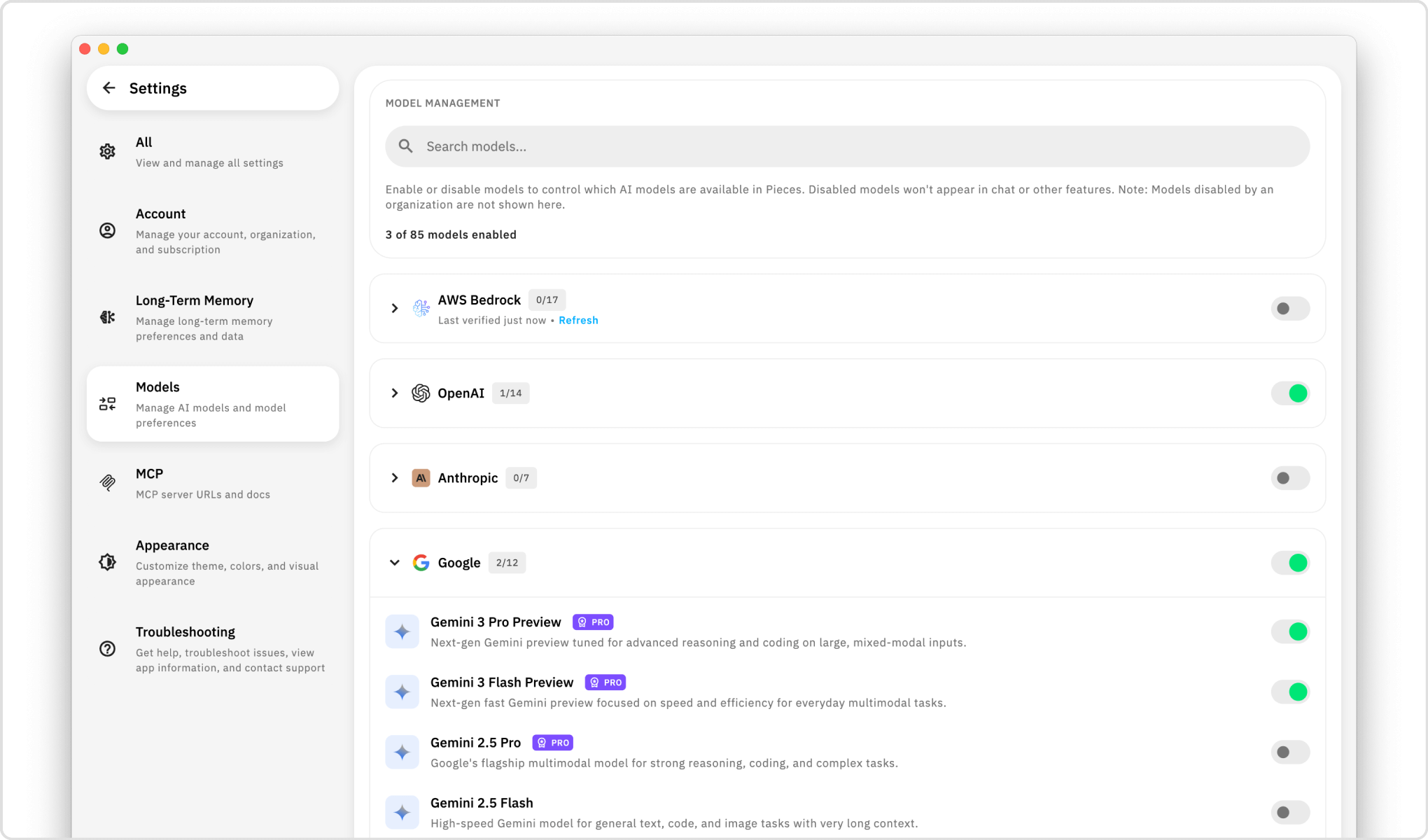
85+ models organized by provider. Enable what you use, disable what you don't.
Your profile menu is now visible in the Start New Chat view. One click to Settings. One click to check for updates. One click to pause or resume Long-Term Memory capture. No more hunting through menus.
For organizations using AWS Bedrock, we now support Inference Profiles directly in Pieces. This gives enterprises fine-grained control over which teams can access which models—all while keeping inference on your own infrastructure.
- Inference Profile support for Bedrock API Keys
- Per-team model access — assign different profiles to different teams (e.g., developer-team-claude-haiku-4-5, marketing-team-claude-haiku-3-5)
- Full model coverage — Claude Haiku 3.5, Claude Haiku 4.5, Claude Opus 4, and more
- Manage from the Pieces Portal — configure profiles under Settings → API Keys

Manage AWS Bedrock Inference Profiles per team—full control over who can access which models.
Enterprises running BYOK (Bring Your Own Key) deployments need granular control over model access. Inference Profiles let you allocate specific models to specific teams, manage costs, and maintain compliance—all while keeping data on your own AWS infrastructure.
You generated a Day Recap. It mentions a debugging session you'd forgotten about. Now you want to know more—what files were involved? What did you actually change?
The new "Start Related Chat" button—in the bottom right of any open summary—turns it into a conversation.

One tap loads the summary and all its context into a new chat—ready for follow-up questions.
- One tap — Opens a new chat view with the original summary attached as a preview card
- Full context loaded — The summary and all associated events are already in your chat context
- Ask anything — "What files were involved?", "Walk me through that debugging session", "What did I decide about the API design?"
- No setup required — Just ask your question and go deeper
Your summaries aren't just reports—they're starting points for deeper exploration.
Not sure what a summary does? When to use Morning Brief vs. Day Recap? Whether Time Breakdown is right for your workflow?
Every Single-Click Summary now has a "See it in action" link. Hover over it to watch a quick preview video—so you can see exactly what you'll get before you generate.

Hover over "See it in action" to watch a quick preview before you generate.
- What output this summary creates
- When and why to use it (Morning Brief for starting your day, Time Breakdown for billing)
- Real examples showing the value
- Tips to get more out of it
No more guessing. Watch the preview, click Generate, get exactly what you expected.
Explore each Single-Click Summary in action with our video tutorial series:
| Summary Type | Duration | Watch |
|---|---|---|
| What's Top of Mind | 0:36 | Watch |
| Standup Update | 0:38 | Watch |
| Custom Summary | 0:38 | Watch |
| Day Recap | 0:35 | Watch |
| Week Recap | 0:33 | Watch |
| Morning Brief | 0:34 | Watch |
| Professional Persona | 0:45 | Watch |
| Collaboration Patterns | 0:38 | Watch |
| AI Habits | 0:43 | Watch |
| Time Breakdown | 0:48 | Watch |
Alongside Pieces Desktop 5.0.1, we're shipping PiecesOS 12.3.6 with significant performance improvements and platform enhancements.
- ~21x faster search — Full-text search across conversations, summaries, and materials now returns results in under 10ms (down from ~500ms)
- Smarter result limiting — Broad searches are now capped to prevent UI hangs on large datasets
- Improved semantic search — Powers "Related Materials" and context suggestions with better accuracy
- Historical timestamp support — Summaries generated retroactively now appear at the correct point in your Timeline
- Linux (X11) full support — Clipboard and vision processing now fully supported for WPE on X11
- Offline mode fix — Workstream events now correctly save when running in Local mode
- Enterprise local models — Enterprise users can use downloaded local LLMs (Llama, Phi, etc.) without permission errors
- Migration progress indicator — Large database updates now show a visual progress bar instead of the app appearing frozen during startup
We're building toward LTM-3—the next major evolution of Long-Term Memory that transforms Pieces from individual memory to shared organizational memory. Here's what's on deck:
-
Shared Memory
- Create memory slices that teammates can access
- Query what colleagues worked on while you were out
- Find conversations and decisions across your team, not just your own history
- Example queries: "What did Sarah work on last week?", "Find that conversation where we decided to deprecate the v1 API"
-
Native Audio Capture (targeting Feb 6th)
- Form memories from meetings, calls, and videos via system audio
- Your spoken context becomes searchable alongside everything else
-
Multi-Turn Agentic Chat (targeting Feb 6th)
- A new stateful agent that maintains context across many interactions
- Conversations that actually remember where you left off—no more re-explaining context
-
Native Filesystem Ingestion
- OS-level file path search, verification, and IO events
- Correct file paths in retrieval
- See relevant files surface proactively based on your current activity
-
Native Browser History Ingestion
- Searches, browsing history, and corrected URLs
- Website metadata captured alongside your workstream
- Better context about what you researched and when
-
Custom Summary Templates
- Build your own Single-Click Summary templates tailored to your workflow
- Schedule them to run automatically on a cron job
- Have summaries delivered straight to your inbox
- How to Query LTM in Pieces Copilot — Master the art of querying your Long-Term Memory
- How to Use the Workstream Activity Timeline — Understand your work patterns and history
- 10 Queries To Ask Pieces LTM — Get started with powerful LTM queries after 24-48 hours
- 5 Essential Queries for 2+ Months of LTM — Strategic queries for deeper insights, collaboration analysis, and performance reflection
Questions or Feedback?
We'd love to hear what you think! Join our community or reach out to support.
| ← Previous: What's New in Pieces 5.0.0 | Next: What's New in Pieces 5.0.3 → |