Release Date: February 2026 Pieces Desktop: 5.0.3 PiecesOS: 12.3.8
You're in a technical discussion during a pair programming session. Decisions are made, approaches debated, context shared. Two hours later, you can't remember exactly what you decided—or why.
Pieces 5.0.3 fixes that. This release introduces LTM Audio in preview, letting you capture audio context from meetings and calls to enrich your memories. Beyond audio, you get unprecedented control over your summaries, deeper MCP integrations, and enhanced support for technical workflows—making Pieces more flexible, more powerful, and more integrated into the tools you already use.
LTM Audio is now available in preview. Activate LTM Audio to include both microphone input and system audio output as part of your Long-Term Memory formation.
This is particularly useful for capturing context from meetings, pair programming sessions, video calls, and other audio-rich workflow moments. Pieces processes the audio locally to extract meaningful context, which then flows into your memory formation — making your summaries, Pieces Chat conversations, and Workstream Activity richer and more complete.
Microphone Capture
- Capture your voice and ambient audio from meetings
- Include your questions, explanations, and discussions in memory formation
- Perfect for pair programming sessions and team discussions
System Audio Capture
- Capture audio from video calls, webinars, and presentations
- Include context from online meetings and training sessions
- Process audio from screen recordings and tutorials
Context Integration
- Audio context flows into your Long-Term Memory automatically
- Enriches summaries with discussion points and decisions
- Makes Pieces Chat more context-aware
ltm-audio-enablement-both-1.mp4
Capture context from meetings, calls, and sessions to make your memories richer and more complete.
- Via User Profile Menu—Click your User Profile menu and select "Enable LTM Audio"
- Via PiecesOS Toolbar—Open the PiecesOS Toolbar application and look for the "Enable LTM Audio" button
- Grant Permissions (macOS)—On macOS, you'll need to enable two new system permissions for LTM Audio to function properly
- Start Capturing—Audio context will begin flowing into your memory formation
Meeting Context
- Capture decisions and action items from team meetings
- Remember discussion points and follow-ups
- Include meeting context in your daily summaries
- Coming soon: a dedicated Summarize Recent Meetings single-click summary for instant call recaps
Pair Programming Sessions
- Capture technical discussions and problem-solving approaches
- Remember solutions discussed during collaborative coding
- Include pair programming insights in your workstream
Training & Learning
- Capture context from webinars and online courses
- Remember key concepts and explanations
- Build a searchable knowledge base from audio content
Video Call Notes
- Automatically capture context from client calls
- Remember commitments and next steps
- Include call summaries in your work history
Preview Status
- LTM Audio is currently in preview — we're actively refining the feature
- Your feedback helps us improve accuracy and performance
- Some edge cases may still be optimized
What's Coming
- Enhanced transcription accuracy
- Better speaker identification
- Improved context extraction from technical discussions
- More granular privacy controls
📖 Full Guide: How to Enable LTM Audio Capture | How to Set Up macOS Permissions for LTM Audio
Tired of re-configuring the same summary parameters over and over? You can now save your own custom summary templates for one-click generation whenever you need them.
If your ideal summary isn't in the pre-set library, create your own: customize the name, pick a color and icon, and define exactly what it generates. Once saved, your template lives alongside the built-in options and can be triggered with a single click—just like Morning Brief or Day Recap.
Enhanced Custom Summary Scoping
- Custom summaries now support scoping by time range, websites, project signals, and applications
- Combine multiple dimensions for ultra-precise summaries (e.g., "Last 3 days, VS Code only, focused on the authentication project")
- Filter by specific domains, exclude distracting sites, and target individual apps for focused output
Template Builder
- Create templates with custom names, colors, and icons
- Define scoping parameters (time, websites, projects, apps) once, reuse forever
- Set default prompts and output formats
- Preview templates before saving
Template Library
- Your custom templates appear alongside built-in summaries
- Organize templates by category or frequency of use
- Edit or delete templates anytime
- Share templates with your team (coming soon)
One-Click Generation
- Generate from templates with a single click
- No need to reconfigure parameters each time
- Consistent output format every time
- Perfect for recurring workflows
custom-summary-templates-1.mp4
Build it once, use it forever. Your workflow, your templates, your way.
Recurring Standup Formats
- Create templates tailored to your team's specific standup structure
- Generate consistent updates that match your team's format
- Save time on daily standup prep
Client-Specific Progress Reports
- Build templates for each client with their preferred structure
- Include only relevant projects and timeframes
- Generate professional updates quickly
Personal End-of-Day Reflections
- Create templates for your preferred reflection format
- Focus on specific areas: accomplishments, challenges, tomorrow's priorities
- Build a consistent personal review habit
Project-Scoped Weekly Summaries
- Generate weekly summaries for active projects automatically
- Track progress across multiple weeks with consistent format
- Share updates with stakeholders without manual formatting
- Start a Custom Summary—from Home Base or the Summaries section
- Set Your Scoping—Choose time range, websites, projects, or applications
- Customize Your Template—Name it, pick a color and icon
- Save—Your template appears alongside built-in summaries
- Generate with One Click—Tap your template anytime for consistent, focused output
Consistency saves time. When you find a summary format that works, you shouldn't have to recreate it every time. Custom templates — combined with the new scoping and filtering options — let you capture your workflow preferences once and reuse them indefinitely. This is especially valuable for teams that need consistent reporting formats or professionals who want to build habits around regular reflection and communication.
📖 Full Guide: How to Create and Save Custom Summary Templates
The Pieces MCP Server has been upgraded with significantly more tools available to MCP-compatible clients like Cursor, Claude Code, Goose, and others.
This expansion gives these tools much deeper access to your Long-Term Memory, enabling richer, more context-aware responses when you interact with Pieces through any MCP client. Ask your Cursor agent to recall what you worked on last week, pull in details from a recent meeting, or reference code changes from earlier today—all powered by a broader set of MCP capabilities.
Retrieval Tools
- Expanded access to workstream summaries and conversations
- Deeper search across your entire memory graph
- More granular filtering and scoping options
- Better support for temporal queries
Search Capabilities
- Full-text search across all memory types
- Semantic search for conceptually related content
- Filter by time, source, topic, and people
- Multi-entity search across conversations, summaries, and materials
Contextual Metadata
- Access to annotations and tags
- Relationship mapping between memories
- Project and topic clustering
- Collaboration network insights
Temporal Queries
- Query memories by specific time ranges
- Find content from "last week" or "in August"
- Compare work across different time periods
- Track evolution and patterns over time
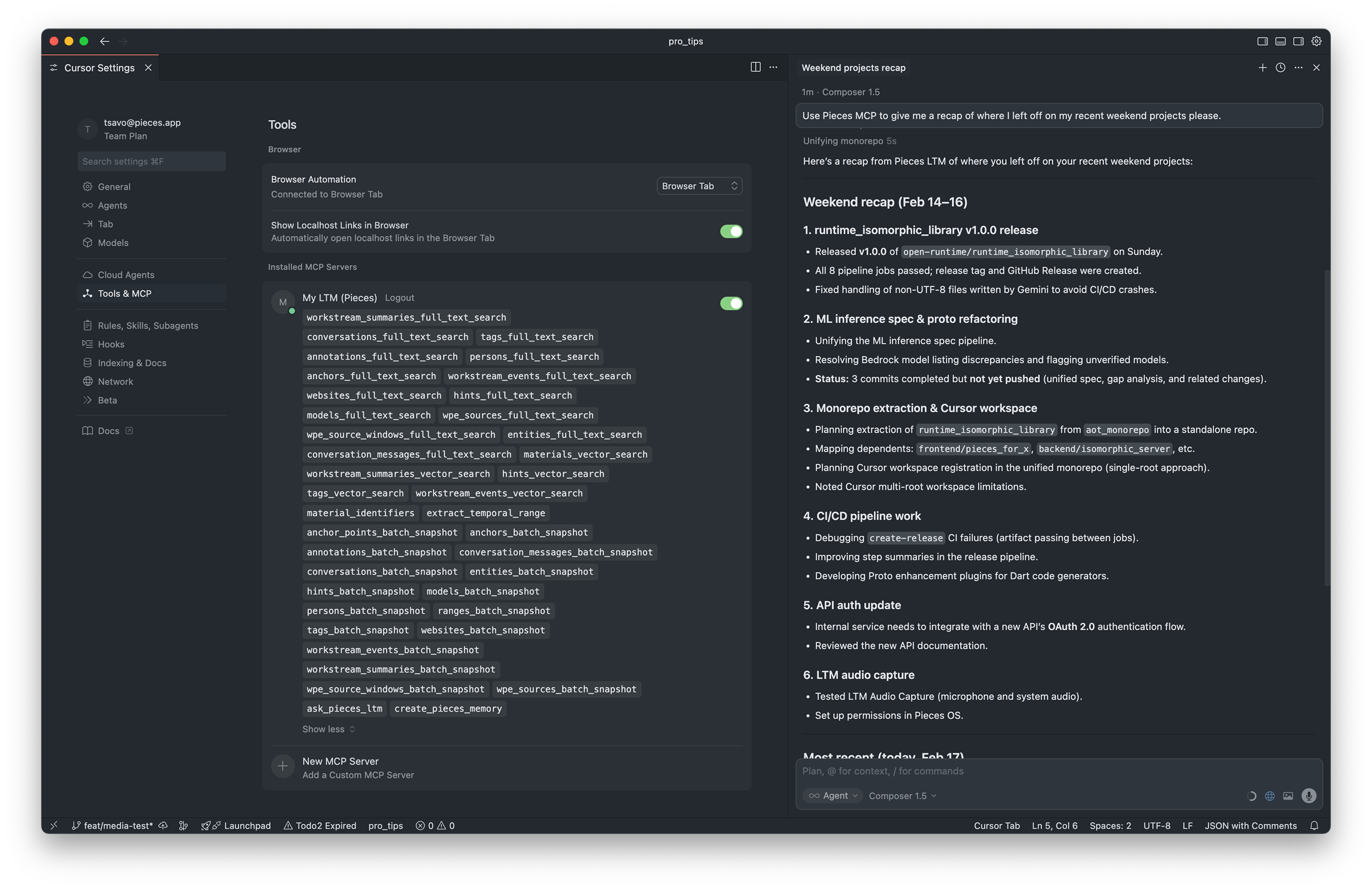
Ask your Cursor agent to recall what you worked on, reference past decisions, or pull in context from recent meetings.
Expanded Retrieval Tools
- More granular access to summaries, conversations, and workstream events
- Better support for filtering and scoping queries
- Improved result ranking and relevance
Deeper Search & Filtering
- Search across your entire memory graph with better accuracy
- Filter by multiple dimensions simultaneously
- Semantic search that understands context, not just keywords
Granular Metadata Access
- Access annotations, tags, and contextual metadata
- Understand relationships between different memories
- See how projects and topics cluster together
Temporal Query Support
- Query by specific time ranges with natural language
- Find content from relative time periods ("last week", "in August")
- Compare work across different time windows
- Track patterns and evolution over time
If You're Already Using MCP
- New tools are available automatically—no action needed
- Update your MCP client to the latest version for best results
- See the Pieces MCP and LTM Tools Reference for the complete list of 39 tools now available to your agents
If You Haven't Connected Yet
- See Agent Setups & Integrations — step-by-step config guides for 19 tools (Cursor, Claude Code, Goose, VS Code, Windsurf, and more) with exact JSON configs and file paths
- Connect Cursor, Claude Code, or any MCP-compatible client in minutes
- Start asking questions about your work history immediately
Accessing Pieces from Cloud-Based Agents or Remote Machines
- See Connecting to PiecesOS via Ngrok — expose your local PiecesOS over HTTPS so Claude web, ChatGPT, GitHub Actions, or any remote agent can reach your Long-Term Memory
- See Bridging Local MCP Clients with mcp-remote — connect stdio-only clients like Claude Desktop (JSON config), Zed, and Raycast to the Pieces HTTP endpoint
In Cursor:
- "What did I work on last week?"
- "Find that conversation where we decided to use React instead of Vue"
- "Show me code changes related to the authentication module"
In Claude Code:
- "What meetings did I have about the API redesign?"
- "Pull in context from my recent research on microservices"
- "What errors did I encounter while working on the payment integration?"
Your AI assistant should know your work history. When you're coding in Cursor or chatting with Claude Code, these tools should be able to reference your past work, decisions, and context. The expanded MCP Server makes this possible by giving these tools the same rich access to your Long-Term Memory that Pieces Conversational Recall has. The result? More context-aware assistance, better code suggestions, and AI that actually understands your project history.
Time Breakdown now supports configurable time ranges, so you can choose the window of activity you want to reconstruct.
Previously, Time Breakdown analyzed a fixed period. Now you can choose from preset ranges—last 24 hours, last 2 days, last week, and more—so you can generate billable-hour reconstructions that match your reporting needs.
Configurable Time Ranges
- Last 24 Hours—Perfect for daily timesheet submissions
- Last 2 Days—Mid-week client updates and progress reports
- Last Week—Weekly billing summaries and comprehensive reviews
- Custom Ranges—Any time window that fits your workflow
- Date Range Picker—Select specific start and end dates
Flexible Reporting
- Generate breakdowns for any period you need
- Match your billing cycle exactly
- Create reports for specific project phases
- Reconstruct time for any custom window
Consistent Output Format
- Same structured format regardless of time range
- Time blocks organized by project and activity
- Editable entries for refinement
- Export-ready for billing systems
time-breakdown-demo-2.mp4
Select your preferred range before generating a Time Breakdown and get audit-ready time logs scoped to the period you need.
Daily Timesheets
- Generate breakdowns for just the last 24 hours
- Submit accurate daily time logs without manual reconstruction
- Perfect for professionals who bill daily
Mid-Week Client Updates
- Create breakdowns covering the last 2–3 days
- Prepare progress reports for active clients
- Show recent activity without overwhelming detail
Weekly Billing Summaries
- Generate comprehensive breakdowns for entire work weeks
- Create weekly billing summaries across all projects
- Track time allocation across different clients
Custom Project Windows
- Reconstruct time for specific project phases
- Generate breakdowns for sprint periods
- Create reports for custom billing cycles
Retrospective Analysis
- Analyze time allocation for past periods
- Compare time spent across different weeks
- Identify patterns in your work distribution
- Open Time Breakdown—from Home Base or Summaries
- Select Your Time Range—Choose from presets or set a custom range
- Generate—Pieces analyzes your captured workstream for that period
- Review & Refine—Edit entries, add context, adjust time blocks
- Export or Submit—Copy, export, or use as foundation for billing
Time tracking shouldn't be one-size-fits-all. Different professionals have different billing cycles, reporting requirements, and workflow needs. Configurable time ranges let you generate Time Breakdowns that match your actual workflow — whether you bill daily, weekly, or on custom schedules. This flexibility makes Time Breakdown useful for more professionals and more use cases.
📖 Full Guide: How to Generate a Time Breakdown with a Custom Time Range
You're discussing an ML algorithm in Pieces Chat. It responds with \frac{1}{n}\sum_{i=1}^{n}x_i—raw LaTeX syntax that's hard to parse mid-conversation.
Not anymore. Mathematical expressions and scientific notation now render correctly across Pieces. Whether it's inline equations in a Pieces Chat response or formulas embedded in your summaries, LaTeX content is displayed with proper formatting instead of raw syntax—making technical discussions clearer and more professional.
Inline LaTeX Rendering
- Inline expressions render correctly: (E = mc^2), (x = \frac{-b \pm \sqrt{b^2-4ac}}{2a})
- Mathematical notation displays properly in chat responses
- Formulas in summaries show formatted equations
- No more raw LaTeX syntax cluttering your view
Block-Level Equation Support
- Display complex equations with proper formatting
- Multi-line equations render correctly
- Perfect for proofs, derivations, and complex formulas
- Professional presentation of mathematical content
Universal Support
- Works in Pieces Chat responses
- Renders in summaries and workstream activity
- Displays correctly in saved materials
- Consistent formatting across all Pieces views
latex-rendering.mp4
Mathematical expressions and scientific notation now render correctly—no plugins or workarounds needed.
Machine Learning & AI Development
- Discuss algorithms with properly formatted equations
- Reference mathematical models in code discussions
- Share formulas and derivations with team members
- Document ML concepts with correct notation
Data Science Workflows
- Discuss statistical methods and proofs
- Share regression formulas and probability distributions
- Document analytical approaches with proper notation
- Communicate mathematical concepts clearly
Engineering & Physics
- Reference physics equations and formulas
- Discuss signal processing and control theory
- Share engineering calculations and derivations
- Document technical specifications with correct notation
Academic Research
- Share research findings with proper mathematical notation
- Document theoretical frameworks and proofs
- Communicate complex concepts with formatted equations
- Create professional documentation with correct notation
Automatic Detection
- Pieces automatically detects LaTeX syntax in content
- Both inline (...) and block [...] formats supported
- Standard LaTeX syntax recognized and rendered
- No configuration or setup required
Rendering Engine
- Built-in LaTeX rendering engine processes expressions
- Fast, local rendering for immediate display
- High-quality output matching standard LaTeX formatting
- Works offline without external dependencies
Technical workflows involve mathematical notation. When you're discussing algorithms, sharing research, or documenting engineering concepts, you need proper mathematical formatting. Raw LaTeX syntax is hard to read and unprofessional. Native LaTeX rendering means you can communicate technical concepts clearly, share formulas naturally, and create professional documentation — all without plugins, workarounds, or external tools.
Alongside Pieces Desktop 5.0.3, we're shipping PiecesOS 12.3.8 with significant engine upgrades that power the features above and improve the overall experience.
- Dual-stream audio capture — Input (microphone) and output (speakers) captured simultaneously
- 15-second recording intervals — Frequent enough for context, efficient enough for performance
- WAV + metadata pairing — Every audio clip includes structured metadata for accurate timeline placement
- Automatic transcription — Audio is transcribed and indexed for full-text search and LTM retrieval
- Next-generation agentic runtime — Early integration of the engine that will replace the Q&A architecture (more below in What's Next)
- MCP server presets — Pre-configured server configurations for common integrations
- Cloudflare function tools — Infrastructure for serverless tool execution
- Improved tool conformance — Tools now fully conform to the MCP specification for cross-client compatibility
- Batch atomicity improvements — More reliable batch operations for summaries and events
- Deployment info async fix — Resolved sync/async issues in deployment information handling
- Race condition fixes — Addressed workstream summary annotation race conditions where annotations could be lost after creation due to competing timestamp sources
- Cascade delete improvements — Smarter message cleanup logic for conversation management
- Better hyperlinking — Improved link handling in single-click summary output
If you're upgrading to 5.0.3, here's how to make the most of these new features:
- Enable LTM Audio (Preview)—If you're in meetings or pair programming, enable audio capture to enrich your memories
- Build Your First Custom Summary Template—Create a template with the new scoping options for your daily standup or weekly client update
- Explore MCP Integration—If you use Cursor or Claude Code, connect the Pieces MCP Server for deeper context access
- Configure Time Breakdown—Set up Time Breakdown with your preferred time range for billing workflows
- Test LaTeX Rendering—Try asking a question in Pieces Chat about mathematical concepts or formulas to see LaTeX rendering in action
We're continuing to build on the foundation established in 5.0.0 and enhanced in 5.0.1. Here's what's on the horizon:
-
Next-Generation Agentic Engine — Replacing the Q&A Architecture
This is the biggest architectural shift in Pieces Conversational Recall since its inception. For nearly two years, Conversational Recall has been powered by a Question/Answering engine—you ask a question, it retrieves context, it responds. That model served us well, but it's fundamentally limited: it doesn't plan, it doesn't use tools, and it doesn't maintain state across multiple interactions.
We're migrating to a fully agentic architecture powered by a new runtime purpose-built for Pieces. The new engine doesn't just answer questions—it reasons, acts, and remembers:
- Multi-turn stateful conversations — The agent maintains context across many interactions, no more re-explaining where you left off
- Tool use — The agent can call MCP tools, query your LTM, search your codebase, and take actions on your behalf
- Human-in-the-loop approval — For sensitive operations, the agent asks before acting
- Planning and reasoning — Instead of single-shot Q&A, the agent breaks down complex tasks into steps and executes them
The foundation for this new engine is already being laid in PiecesOS 12.3.8. Over the coming releases, it will progressively replace the Q&A engine across Conversational Recall, summary generation, and context retrieval—making every interaction smarter, more capable, and more autonomous.
-
Enhanced Audio Processing
- Ambient audio relevance filtering — reduce wasted processing on noise, TV, and music
- Better transcription accuracy with Voxtral and Moonshine ASR models
- Speaker identification and voice profiles
- More granular privacy controls
-
Shared Memory & Team Context (LTM-3)
- Create memory slices that teammates can access
- Query what colleagues worked on while you were out
- Organizational memory that spans across individual users
-
Native Browser History Ingestion
- Rust-based browser history extraction for Firefox, Chrome, Chromium, and Brave
- Searches, browsing history, and corrected URLs captured alongside your workstream
- Cross-platform support for Linux, macOS, and Windows
-
Native Filesystem Ingestion
- OS-level file path search and verification
- IO events captured as part of your workstream
- Proactive file surfacing based on current activity
-
Scheduled Summary Templates
- Custom summary templates running on cron schedules
- Summaries delivered straight to your inbox
- Automated reporting without opening the app
Thank you for being part of the Pieces community. We're excited to keep building features that make your work more efficient and your memories more powerful! 🚀
- What's New in Pieces 5.0.0—The foundation that powers these features
- Pieces MCP and LTM Tools Reference—Complete reference for all 39 Pieces MCP tools
- Agent Setups & Integrations—Step-by-step config guides for Cursor, Claude Code, Goose, VS Code, Windsurf, and 14 more
- How to Query LTM in Pieces Copilot—Master the art of querying your Long-Term Memory
- How to Use the Workstream Activity Timeline—Understand your work patterns and history
- 5 Essential Queries for 2+ Months of LTM—Strategic queries for deeper insights and performance reflection
Questions or Feedback?
We'd love to hear what you think about 5.0.3! Join our community or reach out to our support team.
| ← Previous: What's New in Pieces 5.0.1 | Next: What's New in Pieces 5.1.0 → |