Settings MQTT Data Values Format

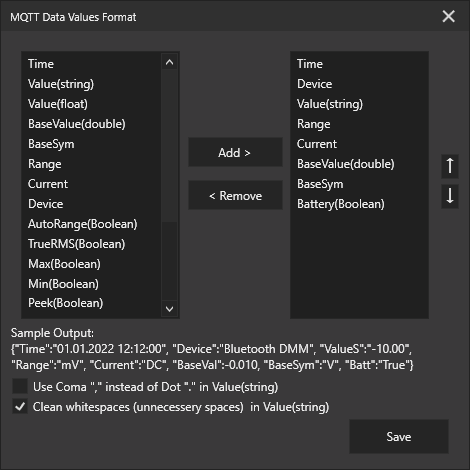
- Logdata over MQTT
| Key | Examp.Value | Values |
|---|---|---|
| Time: | "10/9/2022 9:36:41" | -- |
| Device: | "Aneng V05B" | DeviceName, myDeviceName |
| Value(string): | "11.56" | Numbers, "Auto", ".OL", "EF" |
| Range: | "MΩ" | mV, V, µA, mA, A, Ω, kΩ, MΩ, nF, µF, mF , Hz, kHz, MHz, °C, °F |
| Current: | "" | null, AC, DC |
| Value(float): | "11.560000" | Numbers |
| BaseValue(double): | "11560000" | Numbers |
| BaseSym: | "Ω" | SI-Base Units: V, A, Ω, F, °C, °F |
| Symbols: | "" | AutoRange, Battery, BUZZ(er), DIODE, HV(HighVoltageArrow), INRUSH, MAX, MIN, REL, PEEK, TrueRMS |
Also you can select available datas for sending from app and you can data order rearange.
MQTT Dataformat: JSON Key:Value Pairs
{"Time":"08/12/2022 16:54:11","Device":"BTDMM118","ValueS":"11.57","ValueF":11.57,"Range":"MΩ","Current":"","BaseVal":11570000,"BaseSym":"Ω","Symbols":[]}
Note: The format of the values are in international format.