Skip to content

Conversation

@joshheald
Copy link
Contributor

@joshheald joshheald commented Jan 12, 2023

Closes: #8089

Description

The built-in card reader used with Tap to Pay on iPhone can disconnect for a number of reasons, in general, when the app goes in to the background.

In future, we may automatically reconnect in this scenario, but I've found that there's significant risk in that approach, as we can't always tell whether the payment was taken or not. See pdfdoF-2aX-p2 for more context.

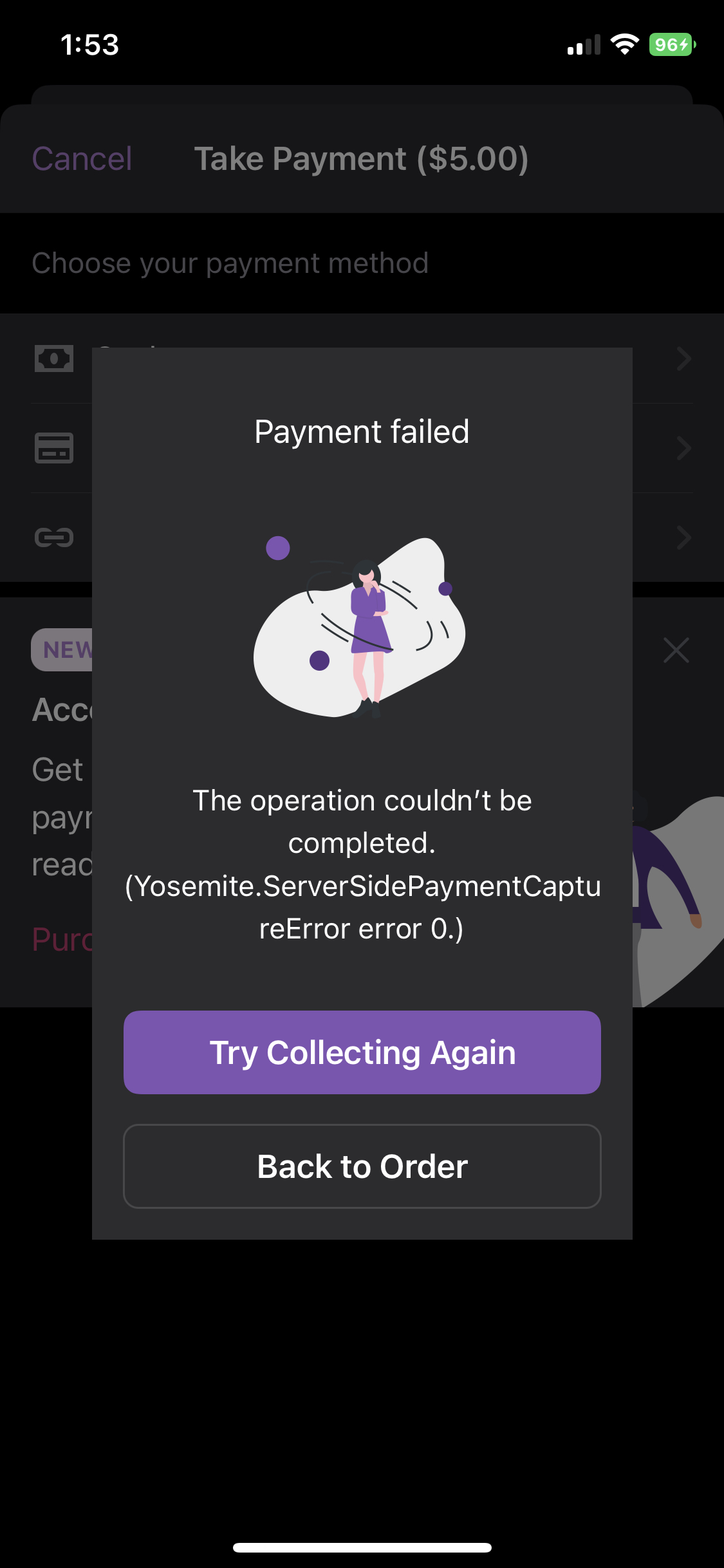
When this happens during a payment, we need to inform the user about the payment failure and how to continue

Changes in this PR

When we get an error collecting the payment, caused by the reader disconnecting, any retry attempt will fail.

By showing a non-retriable error which dismisses the payment flow, the merchant will be taken back to the order and can see clearly whether the payment has gone through or not, before attempting the payment again.

The error message specifically tells the user about this interruption without using the word “disconnected”, which is strange in the context of the built in reader, and informs them about how to continue with the payment.

Testing instructions

Using an iPhone XS or newer on iOS 16.0 or newer on a US store

  1. Navigate to Menu > Settings > Experimental features
  2. Turn on Tap to Pay on iPhone
  3. Navigate to Menu > Payments > Collect payment
  4. Go through the payment flow, and select Card on the payment method screen
  5. When asked for a reader type, tap Tap to Pay on iPhone and go through the Terms of Service Apple ID linking (if you've not done so before)
  6. As soon as the Getting ready to collect payment screen is shown, background the app
  7. Observe that the apple card reader screen shows with the title Canceled
  8. Open the app
  9. Observe that you see a non retriable error telling you about the interrupted payment, and to retry from the order screen.

Screenshots

disconnection.error.mp4

  • I have considered if this change warrants user-facing release notes and have added them to RELEASE-NOTES.txt if necessary.

When we get an error collecting the payment, caused by the reader disconnecting, any retry attempt will fail.

By showing a non-retriable error which dismisses the payment flow, the merchant will be taken back to the order and can see clearly whether the payment has gone through or not, before attempting the payment again.
When the built in reader disconnects during a payment flow, e.g. because of going in to the background, or recieving a call, we handle the error as non-retryable.

This commit updates the error message to specifically tell the user about this interruption without using the word “disconnected”, which is strange in the context of the built in reader, and informs them about how to continue with the payment.
@joshheald joshheald added type: task An internally driven task. feature: mobile payments Related to mobile payments / card present payments / Woo Payments. labels Jan 12, 2023
@joshheald joshheald added this to the 11.9 milestone Jan 12, 2023
@joshheald joshheald requested a review from toupper January 12, 2023 18:23
@wpmobilebot
Copy link
Collaborator

wpmobilebot commented Jan 12, 2023

You can test the changes from this Pull Request by:
  • Clicking here or scanning the QR code below to access App Center
  • Then installing the build number pr8620-8703aa2 on your iPhone

If you need access to App Center, please ask a maintainer to add you.

@joshheald joshheald changed the title Issue/8089 disconnection error message [Mobile Payments] Built-in reader disconnection during payment error message Jan 12, 2023
@joshheald joshheald marked this pull request as ready for review January 12, 2023 18:53
@lmischner
Copy link
Contributor

lmischner commented Jan 12, 2023

I looked at: cancel by backgrounding, cancel by receiving a call, cancel by turning off screen. I tried to look at cancelling by turning off wifi/connectivity via the control center (though I'm not sure I was able to actually target that or if it was just handled the same as backgrounding). I'd imagine the only issue that's specific to this PR is the grammar one -- let me know if you'd like the other two separated into their own GH issues.

Issues found:

  • If I cancel by turning off my iPhone screen, we're still showing the "Order complete!" notification. (Yes, I mentioned this in a comment on Test Charter 2, but it seems potentially relevant to fix with this PR. :) )
  • A nit-picky thing -- in the error message about not being able to use the built in reader during a call, could you add a period to the second sentence?
  • If I cancel after I pay on the Apple screen by backgrounding or closing the screen, I get an error that payment wasn't processed but the order gets marked as completed. The error looks tech-y enough that I'd imagine the merchant would be wary, but it still seems really bad that they might re-initiate payment from the buyer or think they haven't received it.
    Workflow:
  1. Collect Payment > Tap to Pay
  2. When you get to the Apple screen, pay using Stripe test card
  3. When Apple screen goes away, background app
  4. Return to Woo
  5. Note error
  6. Tap "Try Collecting Again"
  7. Note error
  8. Note order status is updated to Completed

RPReplay_Final1673553306.MP4

@joshheald
Copy link
Contributor Author

I looked at: cancel by backgrounding, cancel by receiving a call, cancel by turning off screen. I tried to look at cancelling by turning off wifi/connectivity via the control center (though I'm not sure I was able to actually target that or if it was just handled the same as backgrounding). I'd imagine the only issue that's specific to this PR is the grammar one -- let me know if you'd like the other two separated into their own GH issues.

Thanks for the detailed review @lmischner!

I'll cover what makes sense here, and break anything I need to out into separate issues, but thanks for the offer 😊

This commit prevents us from going through the success flow when Tap to Pay on iPhone payments fail. Previously, if you locked the phone while the Apple payment screen was showing, it would still show a success notice even though the payment hadn’t been taken.
@joshheald
Copy link
Contributor Author

@lmischner first one is fixed in 52e12a0

  • If I cancel by turning off my iPhone screen, we're still showing the "Order complete!" notification. (Yes, I mentioned this in a comment on Test Charter 2, but it seems potentially relevant to fix with this PR. :) )

Thanks for pointing this out again: I should have seen it on the test charter but I thought I'd already fixed it.

Turns out that this is a deeper issue which is likely to affect the existing implementation of (bluetooth reader) card payments. When there's an error in the payment flow, we track that, but also continue through the success flow even though it was a failure.

I've not fixed it in the legacy implementation, because I've not found specific repro steps for how it manifests (locking the phone won't do it as bluetooth readers stay connected even when you lock, unlike the built-in reader.) I'll investigate this so we can fix it with confidence.

@joshheald
Copy link
Contributor Author

  • A nit-picky thing -- in the error message about not being able to use the built in reader during a call, could you add a period to the second sentence?

Good spot, fixed in 8703aa2

@joshheald
Copy link
Contributor Author

  • If I cancel after I pay on the Apple screen by backgrounding or closing the screen, I get an error that payment wasn't processed but the order gets marked as completed. The error looks tech-y enough that I'd imagine the merchant would be wary, but it still seems really bad that they might re-initiate payment from the buyer or think they haven't received it.
    Workflow:
  1. Collect Payment > Tap to Pay
  2. When you get to the Apple screen, pay using Stripe test card
  3. When Apple screen goes away, background app
  4. Return to Woo
  5. Note error
  6. Tap "Try Collecting Again"
  7. Note error
  8. Note order status is updated to Completed

@lmischner Thanks for this one. When I repro it the order has actually been paid for: I checked in the Stripe dashboard and found the order was paid. I'll dig in to whether we know enough to change the error to be more descriptive, but I think given the order shows as paid correctly, it's a safe failure mode. I'll break this into a new issue and handle it separately.

@malinajirka malinajirka modified the milestones: 11.9, 12.0 Jan 13, 2023
@joshheald joshheald added the status: feature-flagged Behind a feature flag. Milestone is not strongly held. label Jan 13, 2023
@toupper toupper self-assigned this Jan 16, 2023
@toupper
Copy link
Contributor

toupper commented Jan 16, 2023

The code looks good and it tests well :shipit:

@joshheald joshheald merged commit 16f46f2 into trunk Jan 16, 2023
@joshheald joshheald deleted the issue/8089-disconnection-error-message branch January 16, 2023 17:28
Sign up for free to join this conversation on GitHub. Already have an account? Sign in to comment

Labels

feature: mobile payments Related to mobile payments / card present payments / Woo Payments. status: feature-flagged Behind a feature flag. Milestone is not strongly held. type: task An internally driven task.

Projects

None yet

Development

Successfully merging this pull request may close these issues.

[Mobile Payments] Handle built-in reader disconnections and reconnection

6 participants