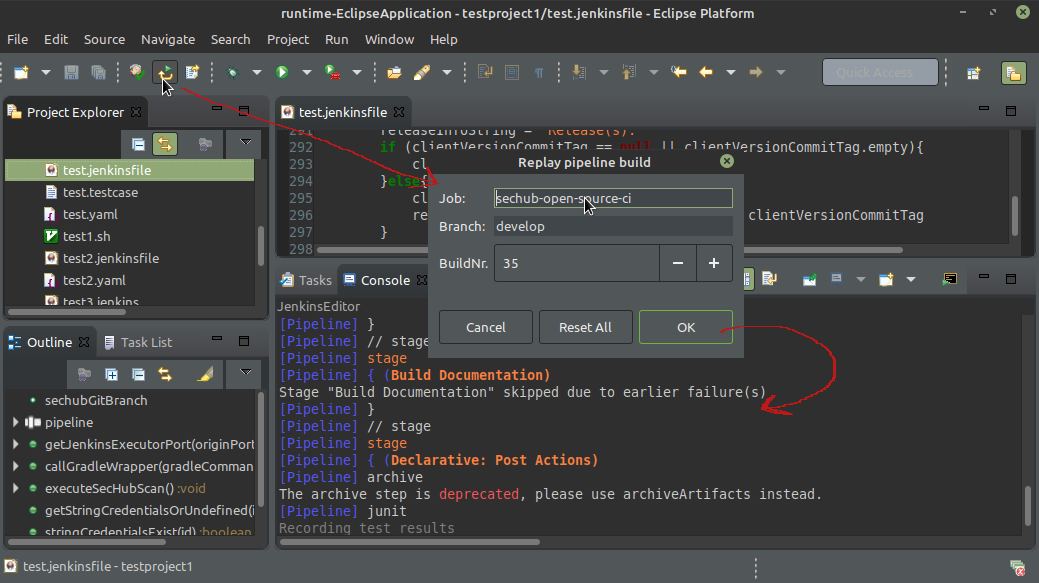
Replay pipeline
Jenkins gives possibility to replay a pipeline starting from a existing build number but with a changed script. This is very nice for bugfixing. Unfortunately the replay was - at least for myself - very cumbersome at web UI.
So the editor provides very easy way to start the replay directly inside the editor and show the log output.
Click on the second icon in Jenkins toolbar as shown in next picture and enter some data for your wanted replay.
As long as the editor is not closed this data will be cached and available on next call. For multibranch pipeline builds you must set the branch name you want to replay.
After pressing OK the replay with current editor content will be triggered and the result of the build will be shown inside the JenkinsEditor Console: