Testscenario
Here are some test scenarios described how to test if there is something wrong with your eclipse installation or if its more a wrong configured jenkins.
Tested with
- Windows10
- Fresh Eclipse 2021-03
- Installed Jenkins Editor Plugin v1.8.0 from eclipse marketplace
- started a Jenkins at Linux VM (bridged network mode, temporary host IP - I call it here
${hostIp}with
#!/bin/bash
# https://github.com/jenkinsci/docker/blob/master/README.md
sudo docker run -p 8080:8080 -p 50000:50000 -v jenkins_home:/var/jenkins_home jenkins/jenkins:lts
(at the moment this does start a Jenkins 2.277.4 )
-
After docker image has been started I opened https:/${hostIp}:8080 on my windows machine and finished the installation of jenkins with suggested plugins and create user
testuser. -
Then create at http://${hostIp}:8080/user/testuser/conifgure a new API token for my user , remember it, and saved the page
Than configure at windows machine inside the preferences
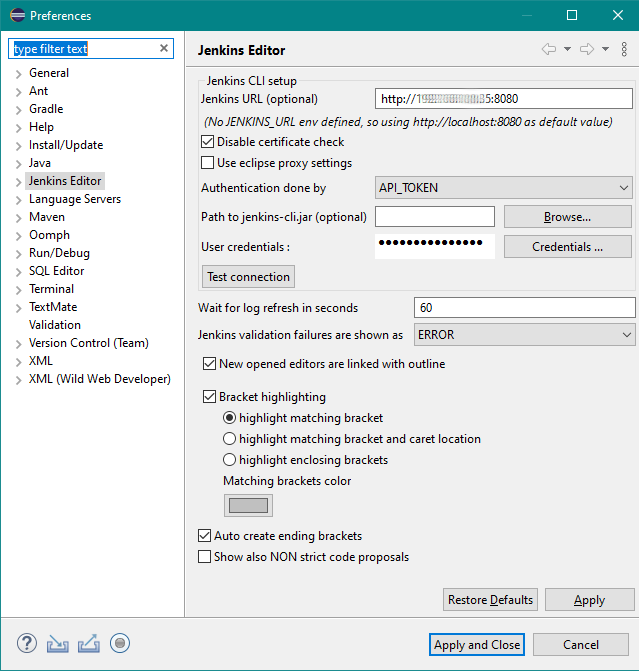
- press the button "credentials", type "testuser" and enter the remembered token
- press "Test connection" button - must work
- press now "Apply and Close" button
- create a new file called it
test.jenkins,open it with Jenkins Editor and enter some pipeline code there - At last check press the Linter button at the main toolbar and check for resulting message from Jenkins