Node: Animation class
This node represents a generic animation animation with all it's properties exposed.
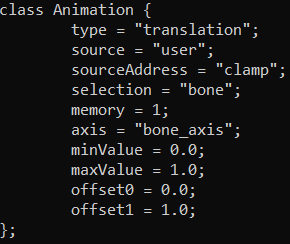
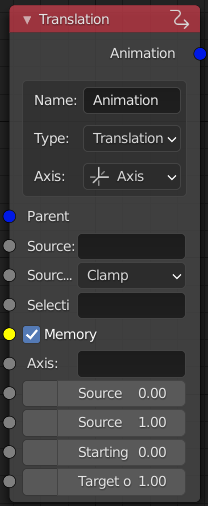
- Name: name of the animation class, all animations must have unique names and follow the naming rules
- Type: type of the animation
- Translation
- Translation X
- Translation Y
- Translation Z
- Rotation
- Rotation X
- Rotation Y
- Rotation Z
- Hide
- Axis:
- Axis: the axis of the animation is defined by an axis selection
- Two points: the axis of the animation is defined by two points along the axis
- Parent: animation parent (only same main type)
- Source: name of the source that provides animation phase values
- Source limit:
- Clamp: clamp the animation between the min and max values
- Mirror: mirror the animation once the phase value reaches the min or max values
- Loop: loop the animation once the phase value reaches the min or max values
- Memory: whether or not the animation axis is defined in the memory LOD
- Axis: axis selection
- Begin: first point of the axis
- End: second point of the axis
- Source phase range start: phase value where the animation starts playing
- Source phase range end: phase value where the animation stops playing
- Type min value (depending on the type selection)
- Starting offset: starting offset along the axis
- Starting angle: starting angle around the axis
- Hide threshold: hide the selection once the source reaches the threshold
- Type max value (depending on the type selection)
- Target offset: finishing offset along the axis
- Target angle: finishing angle around the axis
- Unhide threshold: unhide the selection once the source reaches the threshold
(The floating point values have options to treat them as degrees units, these values are converted to radians during processing)
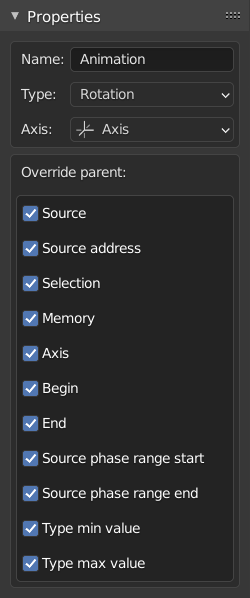
- Name: see the node properties above
- Type: see the node properties above
- Axis: see the node properties above
- Override parent:
- True: input socket for the respective property is enabled
- False: input socket for the respective property is disabled