Flash Utility
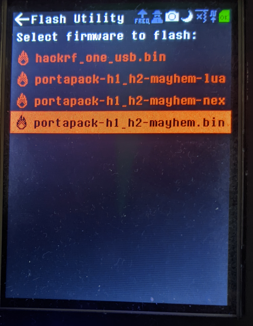

The Flash Utility allows you to install new firmware directly on your PortaPack — without needing a PC. It is the preferred update method for users in the field or those with OS compatibility issues.
Download the latest release from the Releases page and place the file(s) in the FIRMWARE/ folder on the SD card.
Two file types are supported:
| File | Description |
|---|---|
mayhem_vX.X.X.ppfw.tar |
Recommended. Contains both the firmware image and all external apps. The Flash Utility extracts and installs everything automatically. |
portapack-h1_h2-mayhem.bin |
Firmware image only. External apps in the APPS/ folder are not updated — old apps may stop working if their version no longer matches the new firmware. |
Tip
The easiest method is to unzip mayhem_vX.X.X_COPY_TO_SDCARD.zip directly onto your SD card. This places the firmware in FIRMWARE/ and also updates the external apps in APPS/ and any other required data files.
Note
The SD card can be accessed either by physically removing it or — while the PortaPack is connected via USB — by using the SD-Over-USB app.
-
Open Flash Utility from the Utilities menu.
-
The file browser shows all firmware files found in
FIRMWARE/:-
.binfiles are shown in red -
.tarfiles are shown in cyan
-
-
Select the desired file.
-
A confirmation dialog appears:
"This will replace your current firmware. If things go wrong you are required to flash manually with dfu."
Select Yes to proceed.
-
If a
.tarfile was selected, it is automatically extracted first. The display shows the filenames as they are unpacked. -
The firmware file is validated before flashing. If the file is corrupt or the wrong size, the error
BAD FIRMWARE FILE OR W/R ERRis shown and the process is aborted — your current firmware remains intact. -
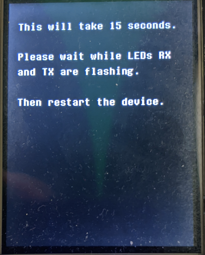
Flashing begins. The display shows:
"This will take 15 seconds. Please wait while LED RX is on and TX is flashing."
Do not power off the device during this step.
-
The device automatically restarts when flashing is complete.
The version of any External-apps-informations must match the version of the currently running firmware. If only the main firmware .bin is updated without also updating the APPS/ folder, old external apps will not run. Using the .ppfw.tar bundle (see above) avoids this problem entirely, as it updates both the firmware and all external apps in a single step.
Sometimes something goes wrong and the PortaPack refuses to turn on again. No matter what happens, you can always recover from this situation — the PortaPack has a DFU (Device Firmware Upgrade) mode built into hardware that can never be deleted or overwritten. See Update-firmware-troubleshooting for recovery instructions.