-
Notifications
You must be signed in to change notification settings - Fork 1.6k
zh deploy langbot one click bt
langbot-wiki-sync[bot] edited this page Jul 29, 2026
·
1 revision
使用宝塔面板一键部署 LangBot。
Warning
如果你已经安装了宝塔,请更新到 9.2.0 及以上
Note
使用阿里云,服务器价格低至 38 元一年,更可以享受8折优惠,一键安装宝塔更方便
服务器系统推荐(来自宝塔):Debian 12,Ubuntu 22等
本文默认所述的是拥有公网IPv4地址的服务器,如果是家用机器没有公网 IP,可以通过下文中的内网来访问相关页面
打开宝塔面板,使用宝塔官方提供的Linux面板安装脚本,根据自己使用的系统选择对应的脚本
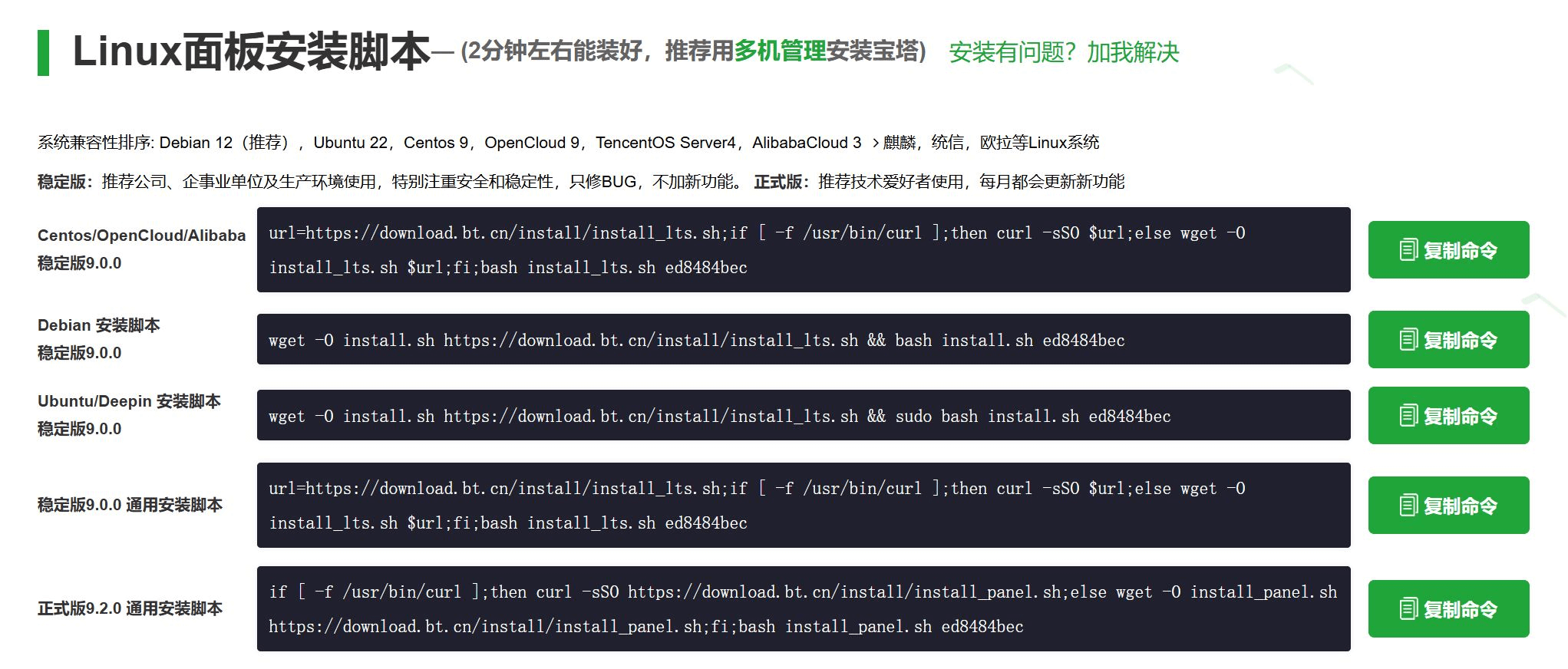
复制对应脚本,粘贴到服务器执行。
等待一段时间后,宝塔安装完成
可以看到提示信息中类似这样的一段,将外网面板地址复制到浏览器打开。

首次打开应该会弹出推荐安装套件,无需安装,关闭跳过即可。
然后点击侧边栏的docker,首次会提示安装Docker和Docker Compose服务,点击立即安装,若已安装请忽略。
然后在Docker -> 应用商店,搜索LangBot(注意大小写),点击安装,使用默认配置。
稍等一段时间,可以看到提示名为langbot_XXXX的容器显示运行中
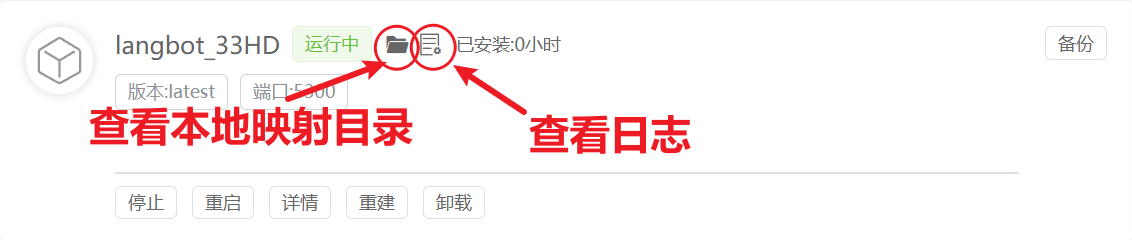
点击上图中红色圆圈查看运行日志
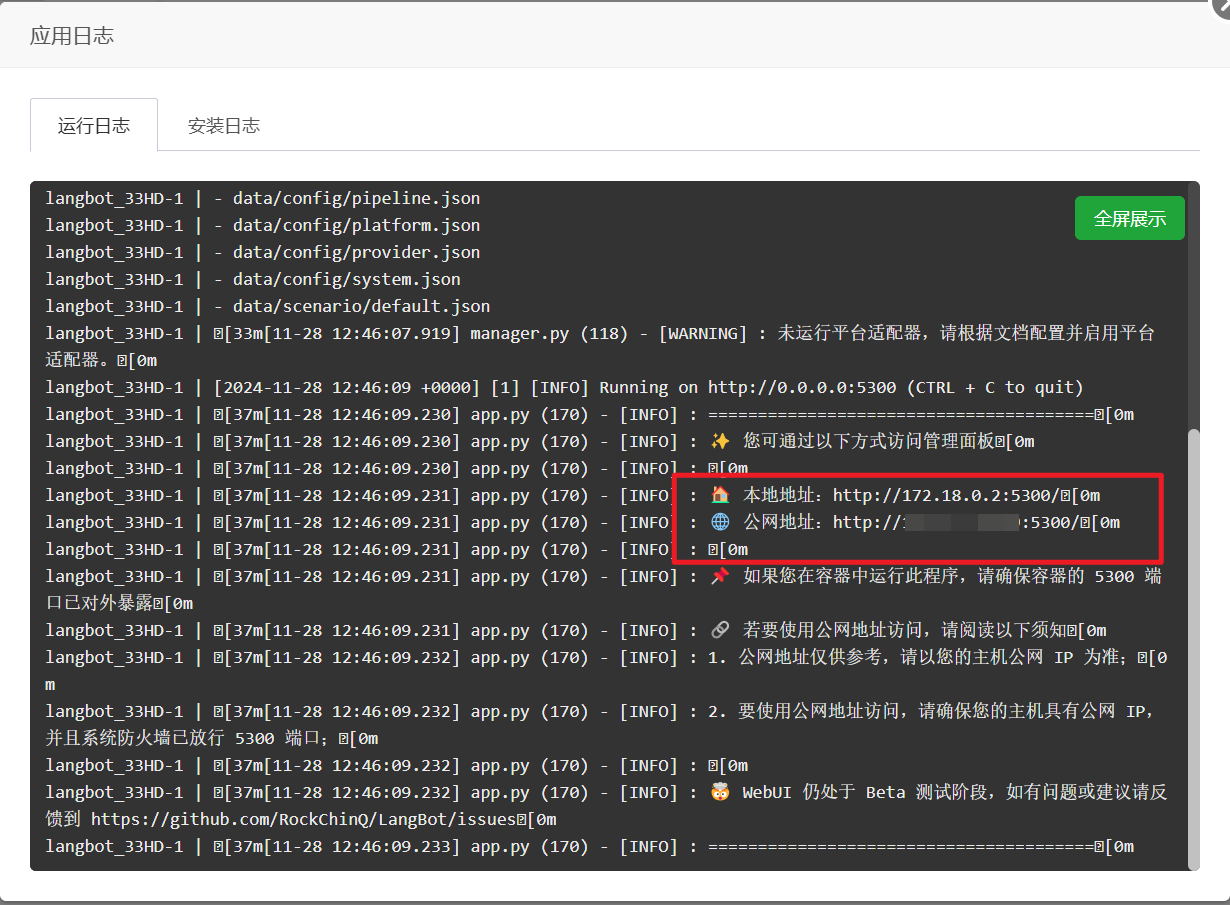
可以看到WebUI的配置页面(可视化配置页面)的外网和内网访问路径,复制公网地址,例如http://xxx.xxx.xxx.xxx:5300(xxx.xxx.xxx.xxx为宝塔面板IP,5300为端口号,可能变化,具体如图)
打开后输入管理员邮箱和密码,然后点击初始化。
然后就可以在可视化界面进行配置了。
接下来请继续阅读配置消息平台页。
Automatically synchronized from langbot-app/langbot-wiki.
简体中文
指南
开发者
- 插件开发
- 插件 SDK API
- 核心开发
文章
- 浏览
- 产品动态
- 技术解析
- 教程与集成
- 公告
API 参考
- Service API
English
Guides
Developers
-
Plugin Development
- Plugin Development Tutorial
- Completing Plugin Configuration Information
- Plugin Directory Structure
- Component Development
- Code Style Guide
- Migration Guide
- Publish Plugin
- Plugin SDK API
- Core Development
Articles
- Browse
- Product Updates
- Engineering
-
Tutorials & Integrations
- LangTARS: Open-Source AI Agent for Remote PC Control — Works with Dify, n8n & 10+ Messaging Platforms
- How to Connect DeepSeek R1 to WeChat, Discord & Telegram in 5 Minutes (FREE)
- Deploy Your Own AI Bot to Discord, Telegram & WeChat in 5 Minutes
- Finally Got My Dify Agent Working in Discord, Telegram and Slack
- How I Built a Multi-Platform AI Bot with Langflow's Drag-and-Drop Workflows
- How I Built a Multi-Platform AI Chatbot with n8n and LangBot
- LangBot 4.6.0 External Knowledge Base Tutorial: Integrating Dify with LangBot for RAG-powered Conversations
- Announcements
API Reference
- Service API
Other pages
日本語
ガイド
開発者
- プラグイン開発
- プラグイン SDK API
- コア開発
記事
- 一覧
- 製品アップデート
- エンジニアリング
-
チュートリアルと連携
- LangTARS:Dify・n8n と連携するオープンソース PC 操作 Agent
- DeepSeek R1 を WeChat・Discord・Telegram に5分で接続する方法
- AI Bot を Discord・Telegram・WeChat に5分でデプロイ
- Dify Agent を Discord・Telegram・Slack で動かす
- Langflow のドラッグ&ドロップでマルチプラットフォーム AI Bot を構築
- n8n と LangBot でマルチプラットフォーム AI Chatbot を構築
- LangBot 4.6.0 外部ナレッジベース入門:Dify と連携した RAG 会話
- お知らせ
API リファレンス
- Service API