help.Concepts
This sections is WIP.
Operators are the central building blocks of everything within Tooll.
Depending on the context we sometimes call Operators...
- "Symbols" - if we're referring to the thing they're describing
- "Instances" - if we're talking about the children within an Operator.
Withing the visual programming community terms like "ops", "nodes" or "patches" are also used, which would be synonyms for "Operator".
The Symbol defines an operator. This includes...
- instances of other Operators and their changed parameters
- connections between these Operator instances
- definitions for inputs and outputs
- descriptions
- animations
- and many other things.
Operators can be nested (I.e. they can container other Operators), they can create code and -- of course -- they can be reused.
If you change any of those all its instances are immediately updated.
- Instances of Symbols (I.e. children within a symbol) are defined by other symbols. The parameters of Instances define how Symbols are used. The [technical details] are more complex but not necessary to understand.
The names of Operators are special, because internally they're full featured C# classes. That might sounds scary, but as an artist without development background you are unlikely to notice any of that. There is one exception though: Because we use the Operator title as a class name it must not contain spaces or special characters, and it must not start with a number. We recommend names starting with an upper case character.
-
MyFirstDemo- ✔Perfect -
myDemo- 🤔 - would work but does not follow the naming convention -
My Demo- 🚫 spaces are not allowed -
My/Demo,My Demö- 🚫 special characters are not allowed -
1stProject- 🚫 must not start with a number
You will find the definition of all Symbols in the folder Types/Operators/. Notice how each definition contains of 3 files:
-
.cs- includes the c# code -
.t3- is definition of all children, connections and animations -
.t3ui- contains information that makes a symbol human readable but is not required when exporting a project as executable.
Each operator has a Namespace. This attribute is important because it defines where the Operator will be stored withing Tooll3's operator database and is used for grouping Symbols within the Operator tree that you seen under AppMenu → Add.
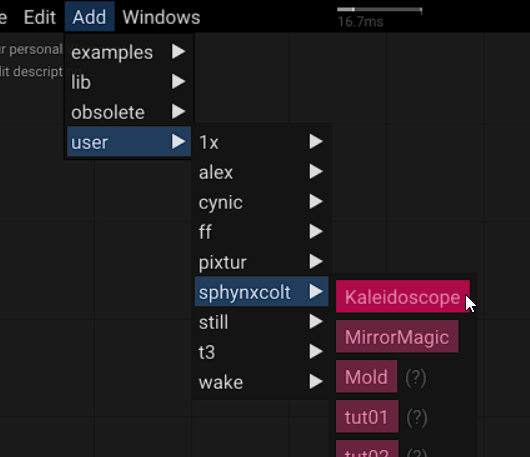
Please follow the following guidelines:
- levels should be separated by a "." character
- levels should start with a lower case character
- levels must not contain spaces or special characters
- You can use an underscore "_" prefix to flag namespaces as internal (I.e. not relevant to other users.)
We recommend the following naming convention for your projects: user.johnDoe.project1. This will make it easy to find your projects and migrate them between Tooll-installations. You can edit the namespace when creating new Operator symbols or in the Parameter-Window
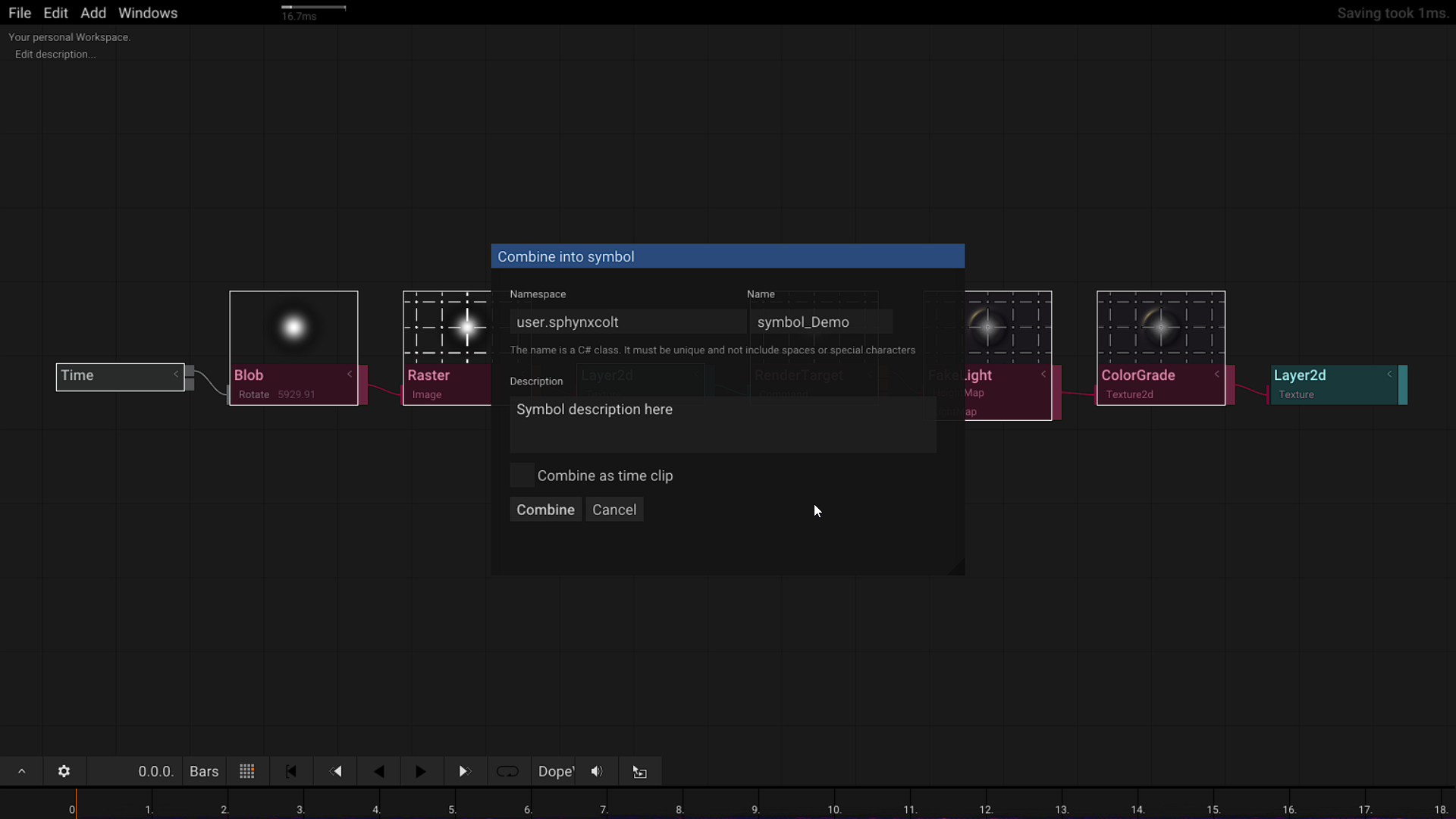
We recommend following this guideline
-
lib.*- core operators that can and should be reused by other projects. -
examples.- tested examples that show how to use operators. Tooll automatically uses the Symbol-name to link Operators to examples. Thus [Blob] will automatically show a link to [BlobExample] that you can study.
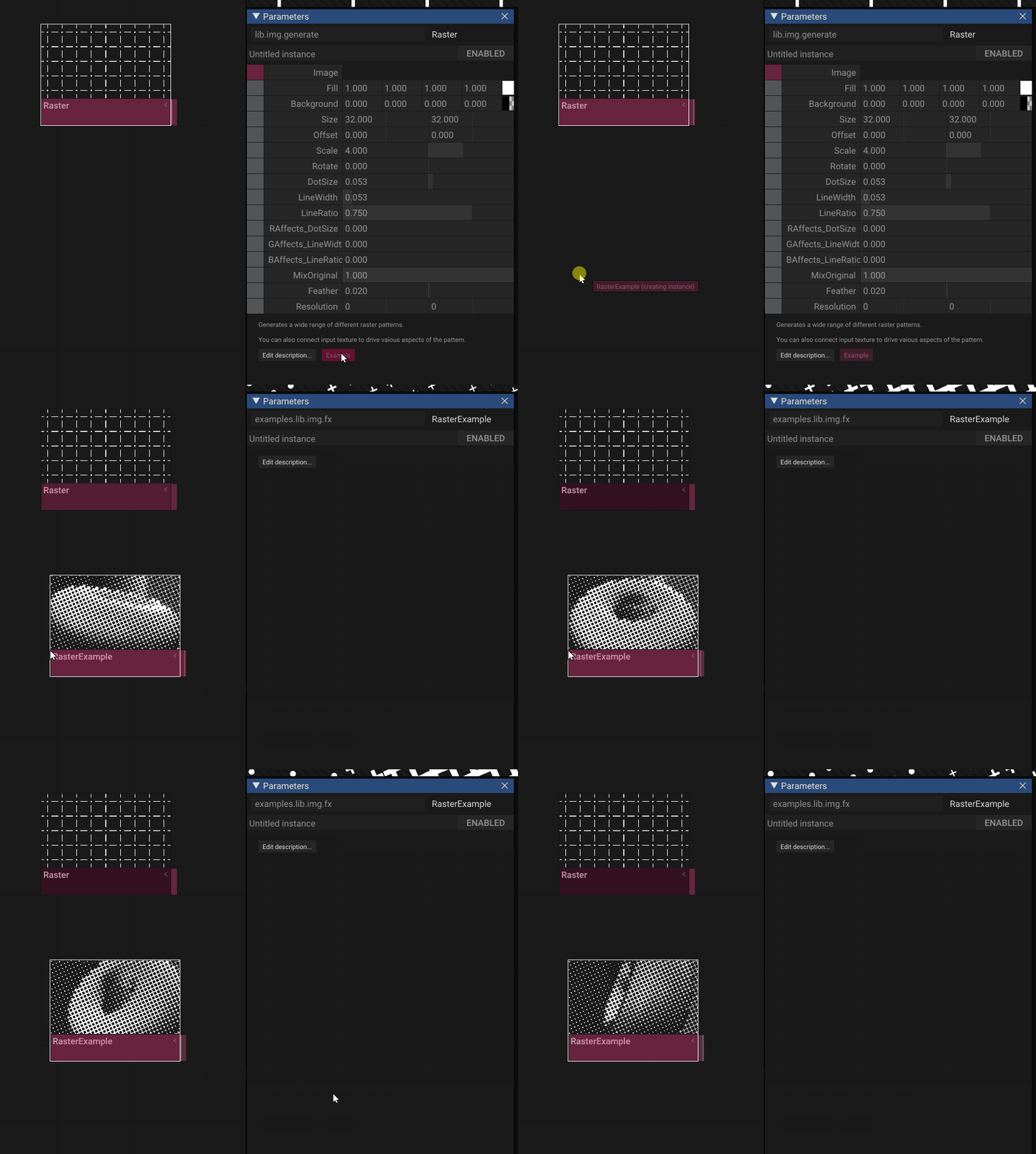
We highly recommend to add short descriptions to all Operator-Symbols. If available this inline documentation will display where ever possible and also improve searching for Operators by synonyms.
You might have notices that Tooll works a lot with numbers like these 723cd13e-0ca0-4995-a80b-a3b616400997. These numbers are so called random unique identifiers. Tooll uses these identifies extensively for referencing between objects. This allows us to rename symbols or its parameters without breaking anything! You can read more about GUIDs on Wikipedia.
Tooll uses realtime rendering and an Library called Dear ImGui to render its user interface. For many reasons the user interface refresh rate is directly synced to the content rendering. This means, if your scenes are too slow to rendering withing 16ms Toolls user interface will become less responsive. In extreme cases it might become unusable.
Tooll3 is a very powerful application this means in many places with can't (and don't want to) limit quality settings. If you wanna render 10 millions points, you can if you have the graphics card for it. If you don't well... tooll will run slow.
also see
Tools directory structure is work in process and is likely to change in the future. At the moment here is a list of relevant directories and their purpose.
-
Operators/--
Types/- The database of all defined Operators
-
-
Resources/- Contains all resources used by tool. It should follow the structure defined by operator namespaces.lib/- resources like shaderscommon/- some common resources that can be used in by all projects.fonts/- fonts used by Tooll (see [How to generate fonts])user/<yourname>/<yourproject1>/- You should store project related resources likes images here. -
.t3/- your personaly settings and temporary files-
backup\- This is very [backups] are saved every 3 minutes. layouts\log\screenshots\Temp\
-
-
.Variations/- Contains Presets and snapshots for Operators -
Export/- -
Install/- -
Render/- -
Resources/-
The following directories are only relevant for developers:
-
.git/- contains the source code version control (only for devs) -
Core/- project for Tooll's core data storage features -
T3/- project for Tooll Editor UI. -
Player/- a project that builds the stand alone exectable player. -
DdsImport/- a project that builds a helper to load images in the DDS format -
CoreTests/- -
OperatorTests/- a project to do automatic testing. Not in use. -
StartT3/- a project that builds Operators assembly updater.
The following are temporary folders and can be ignored:
-
t3.wiki/- a local copy of the documentation -
.idea/- settings for the Rider IDE -
.vs/- settings for the VisualStudio IDE -
packages/- a cache for .net packages that are required to build Tooll -
Debug/-